
Three complaints land on this desk often enough to be a pattern. “I set up ImprovMX and now mail from my site is landing in spam.” “Mail forwarded from my own domain to Gmail intermittently disappears, with no bounce in any log.” “Do I need a mailbox for my domain, or is forwarding enough?” The complaints look different, but they come from one shared confusion: that email on a custom domain is a single thing a single service handles, when in fact every domain has two independent flows (one into the inbox, one out of WordPress) and forwarding only touches one of them.
This is a short field guide to that split for a WordPress operator: what the inbound forwarding layer and the outbound SMTP layer each do, where they interact under DMARC, and what the operator picks when the real question is “where should mail at my domain go.” The ranked picks live in the email forwarding services roundup; this piece is the architecture a reader of that roundup needs to make the comparison legible.
Two directions, two DNS layers
A domain has two independent email paths, and they live in two different DNS record types.
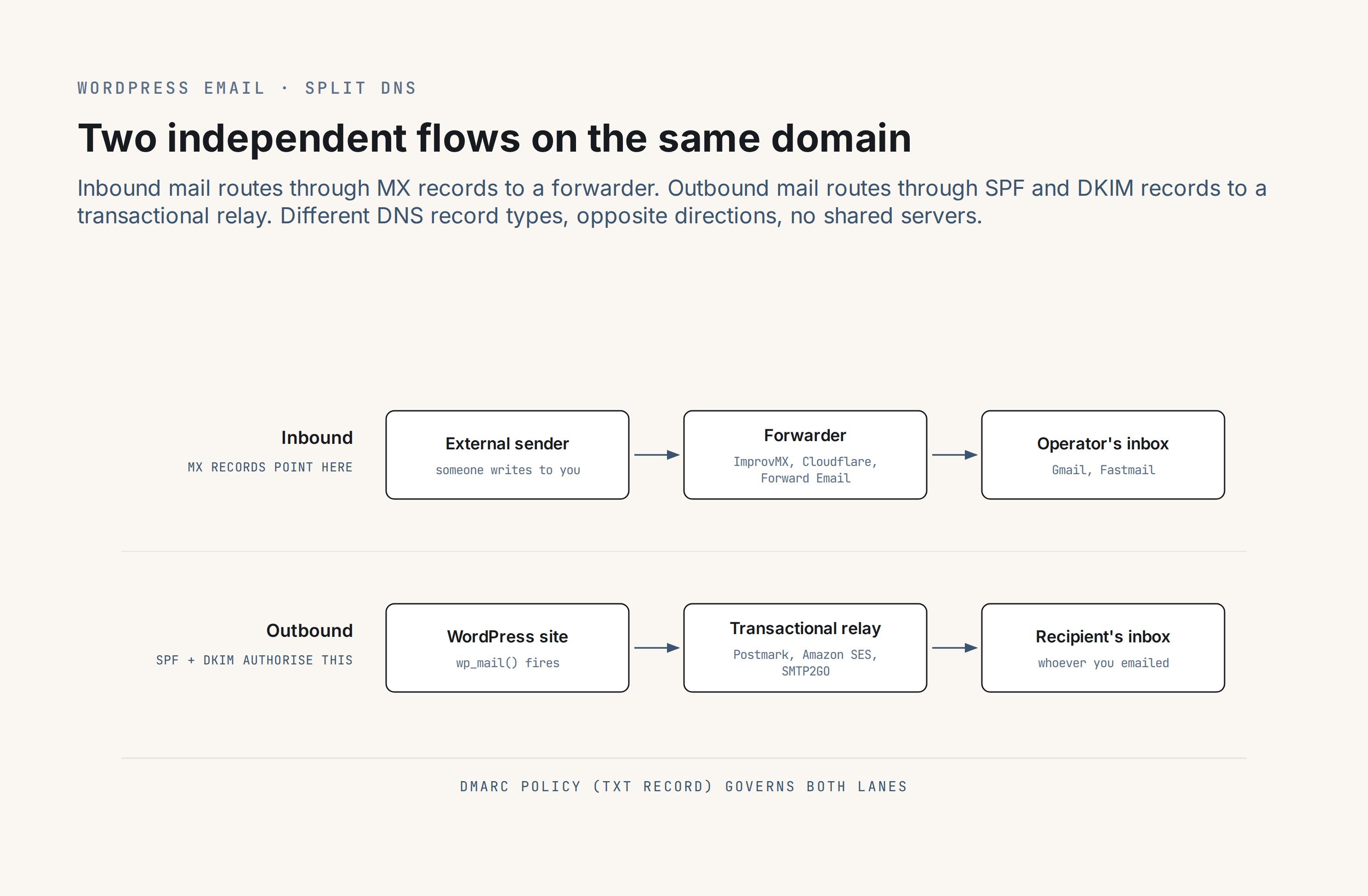
Inbound mail (someone sending [email protected] from the outside) is routed by the domain’s MX records. The MX record names the server that accepts mail on behalf of your domain. A forwarder is a server that accepts mail (so your MX points at it), then re-sends each message onward to whichever real inbox you nominated.
Outbound mail (everything WordPress sends from your site: password resets, contact form notifications, WooCommerce order confirmations, newsletter batches) leaves through a transactional SMTP relay such as Postmark, SMTP2GO, Amazon SES, or Resend. The relay authenticates itself as a legitimate sender for your domain via SPF (Sender Policy Framework) is a DNS TXT record that lists the servers allowed to send mail using your domain. Receivers compare the sending IP to that list and use the result as one input to their accept/reject decision. Read full reference → (a TXT record that lists which servers are authorised to send) and DKIM (DomainKeys Identified Mail) is a cryptographic signature attached to each outgoing message, verifiable against a public key published in DNS. It lets receivers confirm the message was not altered in transit and originated from a server the domain authorised to sign on its behalf. Read full reference →.
The two paths coexist on the same domain, in different record types, serving opposite directions of traffic. There is no conflict and no shared infrastructure. The forwarder sees none of your outbound mail; the relay sees none of your inbound. The one piece of DNS that governs both is DMARC (Domain-based Message Authentication, Reporting, and Conformance) is a DNS TXT record that tells receivers what to do with mail from your domain that fails SPF or DKIM, and where to send reports about those failures. Read full reference →: a policy record at _dmarc.yourdomain.com telling receiving mailservers what to do with a message that claims to come from your domain but fails authentication.
The single most common WordPress-forwarding mistake is treating inbound forwarding and outbound sending as one path and publishing SPF accordingly: adding the forwarder’s include: to the domain’s SPF record, which displaces the authorisation the outbound transactional relay actually needs. The fix starts with the vocabulary: inbound and outbound are separate problems, in separate DNS record types.
MX, SMTP, aliases, catch-all
A handful of terms do most of the operator-level work here, and operators often arrive mixing them.
MX records are a DNS record type that names the servers permitted to receive mail for a domain, with a priority order. A forwarder’s setup instructions always start by replacing the domain’s existing MX records with the forwarder’s. The transactional relay WordPress uses for outbound mail has nothing to do with MX.
SMTP is the protocol that actually carries a message between servers. Both the transactional relay (when WordPress sends) and the forwarder (when it relays an inbound message to Gmail) speak SMTP. “SMTP service” in operator vocabulary usually means an outbound relay; “SMTP via the forwarder” is a separate paid-tier feature covered under Choosing a forwarder below, well below any serious WooCommerce workload in daily cap terms.
Aliases are enumerated addresses that forward to a destination: [email protected] to [email protected], [email protected] to [email protected]. Free-tier forwarders cap aliases per domain and messages per day. ImprovMX’s free tier allows 25 aliases and 500 forwards per day; Namecheap’s free domain-included forwarding allows 100 aliases; Porkbun’s free tier allows 20 and charges $3 per address per year beyond that. Alias caps and daily caps are usually the first paid-tier upgrade trigger.
Catch-all routes *@yourdomain.com to one destination: any address at the domain that is not an explicit alias still lands somewhere. Every typo and every made-up subscription address reaches the operator; so does every address a spam harvester invents. Most forwarders support catch-all; a couple deliberately do not. Of the forwarding entities nanoPost tracks, the two current ones that do not support catch-all are Google Domains / Squarespace Domains forwarding and Porkbun. The capability table in Choosing a forwarder names which do what.
Aliases vs full mailboxes
Forwarding is routing with no storage. The forwarder accepts the inbound message, applies the alias or catch-all rules, and re-sends each message onward to a mailbox that already exists (Gmail, Fastmail, a work account). It does not keep a copy. It does not offer IMAP, webmail, or a calendar. It does not know what “read” or “unread” mean, because it never holds the message after relaying it.
A mailbox provider (Fastmail, Mailbox.org, Migadu, Google Workspace, Microsoft 365) is a different category of service. It stores mail, exposes IMAP, offers webmail, and usually bundles calendar and contacts. Several mailbox providers also offer forwarding as a built-in feature on each custom-domain mailbox, which blurs the distinction; the simple test is whether the service holds the message after delivering it (mailbox) or hands it off and forgets it (forwarder).
Four operator decisions fall out of this split, and they divide along what the operator needs from the service.
The simplest case is getting mail at the domain into Gmail or an existing inbox the operator already reads. A free-tier forwarder is enough here: Cloudflare Email Routing when the domain is on Cloudflare DNS; ImprovMX, Forward Email, or Namecheap’s included forwarding otherwise.
Replying from the forwarded address so recipients see the domain rather than the destination inbox is the second case, and it needs either an SMTP-capable forwarder (Forward Email, ImprovMX Premium, ForwardMX) or a mailbox provider that owns the sending side. A naive reply from Gmail with a free-tier forwarder in place sends from the Gmail address, and the reply headers leak the real destination.
Mailbox features (storage, IMAP, webmail, calendars, shared mailboxes) are a different product class and point at a mailbox provider rather than a forwarder. Fastmail, Mailbox.org, and Migadu are the three independent options the publication tracks closely.
Per-vendor privacy aliases that mask the real address from each counterparty are their own category again: SimpleLogin or Addy are the picks. Both look like forwarders in the DNS layer, with MX pointing at them, but belong to a different product class: identity-masking first, domain-routing second.
The question is a storage question, not a routing question. If the inbox already exists elsewhere and the operator wants mail at the domain to reach it, a forwarder is correct. If the inbox at the domain is the point, the operator wants a mailbox.
DMARC alignment under forwarding
This is where the quiet failures live. A forwarded message can arrive at the destination mailserver intact, pass the receiver’s checks, and land in the inbox. The same message, from the same forwarder, can also arrive and be silently discarded with no bounce back to anyone. The difference is DMARC alignment on the forwarded hop, and whether the forwarder participates in the two schemes that preserve it: SRS (Sender Rewriting Scheme) rewrites the envelope sender during a forwarding hop so SPF realigns at the destination against the forwarder's own domain. First described by Meng Weng Wong in 2003; a de facto scheme with no RFC. The fix that keeps forwarded mail from failing SPF at the receiver. Read full reference → and ARC (Authenticated Received Chain, RFC 8617, 2019, Experimental) is a forwarder's cryptographically signed record of pre-forward authentication. A receiver that trusts the forwarder can accept its attestation that SPF and DKIM passed before the hop, even when the current authentication state has broken on the forward. Read full reference →.
DMARC ( RFC 7489) tells a receiving mailserver what to do with a message that claims to come from a domain but fails authentication. Three policy choices exist:
 p=none (observe and report but take no action), p=quarantine (deliver to spam), and p=reject (refuse delivery outright). In 2026, p=reject is the policy published by most major senders (banks, Google, Microsoft, Shopify, a substantial share of Fortune 500 corporate domains); a message purporting to be from them that fails authentication is dropped by the receiver with no bounce, by design.
Forwarding changes the authentication picture. For a message from [email protected] to [email protected] that your forwarder relays to [email protected]:
- The envelope sender (the SMTP
MAIL FROM) still reads[email protected]by default. SPF at Gmail evaluates against the forwarder’s IP, which is not inbank.com‘s SPF record, so SPF fails. - The DKIM signature survives only if the forwarder does not modify any header or body byte covered by the signature. Most forwarders do not modify, but any content-filter rewrite, footer injection, or header normalisation at the forwarder’s side can break DKIM in transit.
- DMARC passes if either SPF or DKIM pass and align with the From-header domain (
bank.com). SPF has failed. DKIM must survive for DMARC to pass. - If
bank.compublishesp=rejectand DKIM did not survive the hop, Gmail drops the message. No bounce (the policy says “reject”, not “reject and notify”), no diagnostic, no trace in any log the forwarding operator can see.
SRS rewrites the envelope sender during the forwarding hop so that SPF at the destination evaluates against the forwarder’s own domain, which the forwarder’s own SPF record authorises. SRS fixes SPF; it does not fix DKIM, which either survived the hop intact or did not. SRS has no RFC: it is a de facto scheme first described by Meng Weng Wong in 2003 and adopted by every serious forwarder since.
ARC (RFC 8617, 2019) is the second fix. The forwarder cryptographically signs its own record of what the pre-forward authentication looked like at the forwarder’s inbound edge (where SPF passed, because the original sender was reaching the forwarder directly, and where DKIM was intact before any rewrite). A receiver that trusts the forwarder’s ARC chain accepts the forwarder’s attestation that the message authenticated correctly before forwarding, even when the current SPF has realigned and the current DKIM has broken. Gmail honours ARC from forwarders it trusts.
For a WordPress operator forwarding mail from external domains that use p=reject, pick a forwarder that implements both SRS and ARC, or move the critical correspondence to a mailbox provider that does not re-forward at all. (“A mailbox provider does not re-forward” is the whole trick: mail is delivered to storage and sits there, not re-emitted onto the public internet with new authentication to prove.)
Gmail/Yahoo bulk-sender rules under forwarding
The 2024 Gmail and Yahoo bulk-sender rules apply only when a site is the bulk sender (more than 5,000 messages per day to Gmail or Yahoo recipients). Forwarding inbound mail into the operator’s own inbox is not a bulk-send on either side of the chain.
Two interactions with forwarding do catch WordPress operators out, though.
The first: the site is the sender and the recipient uses a forwarder on their own domain. Mail leaves WordPress through the transactional relay with correct SPF and DKIM alignment on the sending domain. The recipient’s domain forwards it to Gmail. If the recipient’s forwarder implements SRS and ARC, the forwarded message authenticates at Gmail and lands normally. If the recipient’s forwarder is a bare registrar forwarder with no SRS, SPF realigns to the forwarder’s IP and fails, DKIM survives if the forwarder leaves the message alone, and the mail arrives on DKIM alone. The authentication the operator controls is DKIM: sign with a strong key the operator owns, and leave p=none or p=quarantine on the site’s DMARC during the first weeks of operation so a forwarder-breakage mode registers as a report rather than a drop.
The second: the site runs a newsletter above the Gmail/Yahoo bulk-sender threshold and some of those subscribers forward their mail. The same forwarding-breaks-SPF dynamic applies, with the added stakes that the bulk-sender rules penalise senders whose spam-rate exceeds 0.3 percent at Gmail by degrading future delivery rates for the whole domain. Mitigation is on the sending side, not the forwarding side: DKIM that survives forwarding, one-click unsubscribe wired correctly, and the full authentication checklist covering SPF, DKIM, DMARC, and the List-Unsubscribe headers.
Deliverability consequences of common operator mistakes
Two mistakes account for most of the deliverability pain that lands at this address. Both come from the inbound-vs-outbound confusion the lead flagged.
The first is the SPF-include-the-forwarder mistake named above. Mechanism: an operator configures a forwarder for inbound mail, then publishes the forwarder’s SPF include: on the domain’s SPF record because the forwarder “handles email” for the domain. The result is that the transactional relay WordPress actually uses for outbound (Postmark, SMTP2GO, Mailgun) is no longer authorised by that SPF record, and every password-reset and WooCommerce receipt the site sends starts failing SPF. The fix is to publish the outbound relay’s include: in SPF, not the forwarder’s. The forwarder receives mail at the domain; receiving does not need SPF.
The second: an operator uses a bare registrar forwarder (no SRS) for inbound mail from senders at p=reject (banks, Google notifications, work accounts on strict corporate DMARC) and some fraction of those messages silently disappear. The fix is either to pick a forwarder that implements SRS and ARC, or to accept the mail into a mailbox provider that does not re-forward.
Choosing a forwarder: capability matrix
The fourteen current forwarding entities nanoPost tracks group into four operator tiers by capability. The table carries the structural facts (catch-all, SMTP sending, SRS, ARC); the prose below carries the picks by operator profile.
| Forwarder | Catch-all | SMTP sending | SRS | ARC |
|---|---|---|---|---|
| Cloudflare Email Routing | yes | separate beta product | yes | partial* |
| Forward Email | yes | Enhanced $3/mo (reputation-based, starts 300/day) | yes | yes |
| Mailwip | yes | Professional 300/day, Business 5,000/day | yes* | yes* |
| ImprovMX | yes | Premium $9/mo | yes* | partial* |
| ForwardMX | yes | included on $30/yr and up | yes* | partial* |
| EmailForwardMX | yes | included on paid tiers | yes* | partial* |
| Namecheap private email forwarding | yes | no | partial* | no |
| Fastmail (mailbox + forwarding) | yes | mailbox provider | yes* | yes* |
| Mailbox.org (mailbox + forwarding) | yes | mailbox provider | yes* | partial* |
| Migadu (mailbox + forwarding) | yes | mailbox provider | yes* | partial* |
| SimpleLogin | n/a (per-alias) | reverse-alias reply only | yes | yes* |
| Addy | n/a (per-alias) | reverse-alias reply only | yes | partial* |
| Google Domains / Squarespace Domains forwarding | no | no | no | no |
| Porkbun email forwarding | no | no | no | no |
<sup>*</sup> SRS and ARC rows marked with an asterisk are based on service-architecture inference from the capability data in the publication’s entity dossiers; direct vendor-doc citation of SRS or ARC behaviour was not located for those entries. Cloudflare’s postmaster documentation explicitly describes SRS and adds two DKIM signatures to forwarded mail; ARC is documented at the Cloudflare Email Service umbrella level without an Email Routing-specific statement. Forward Email’s FAQ explicitly states SRS and ARC on all plans.
The four operator tiers run from safest to riskiest for forwarded mail from strict-DMARC senders.
Forward Email is the only entry with both SRS and ARC explicitly documented in vendor material. Cloudflare Email Routing sits with it as the other safest-tier choice: its postmaster documentation describes SRS plus two DKIM signatures added to each forwarded message, and ARC is documented one layer up at the Cloudflare Email Service product line. Either is the right starting point for forwarding mail from senders at p=reject.
Mailwip, ImprovMX, ForwardMX, and EmailForwardMX form the second tier. SRS plus DKIM re-signing on outbound is the design the capability data supports; ARC coverage is thinner or inferred rather than explicitly documented. These are safe for SPF alignment but worth verifying against current vendor documentation if a lot of forwarded senders are strict-DMARC domains.
Namecheap’s private email forwarding sits in the third tier: SRS is partial or implied by architecture, and ARC is not documented. Workable for lower-risk inbound; not where to forward bank or corporate mail.
Google Domains / Squarespace Domains forwarding and bare registrar forwarding on some Porkbun configurations sit at the bottom of the tier list. Neither implements SRS or DKIM re-signing on forwarded mail, so forwarded messages from strict senders can fail silently.
Choosing forwarding vs a mailbox for a WordPress site
For a WordPress site that already runs on Cloudflare DNS and needs inbound forwarding only, Cloudflare Email Routing is the default free choice. It is a finished product rather than a beta, its postmaster docs describe SRS envelope rewriting plus two DKIM signatures added to each forwarded message (one on email.cloudflare.net for the rewritten envelope, one on the configured recipient domain), and ARC support is documented at the Cloudflare Email Service umbrella level. Setup is one dashboard toggle away from a domain the operator already manages. Pair it with a transactional relay (Postmark, SMTP2GO, Amazon SES) for the outbound side.
For a WordPress site off Cloudflare that needs inbound forwarding only, ImprovMX on the free tier is the longest-track-record option and Forward Email on the free tier is the privacy-focused alternative. Either is fine. Forward Email adds documented ARC alongside SRS, which matters if the forwarded senders include a lot of p=reject domains.
For a WordPress site that needs the forwarder to also send mail from the domain (small-volume replies, admin mail, newsletter batches well under a few hundred a day), Forward Email Enhanced at $3/month is the cheapest with-sending option (reputation-based: senders start at 300/day and the per-day threshold climbs through 500, 1,000, 2,000, 5,000, and 10,000 as reputation builds), and ImprovMX Premium at $9/month is the longest-track-record alternative. ForwardMX at $30/year sits between them and includes SMTP sending on every paid tier, which is the right choice for an agency managing many domains at once.
For a WordPress operator who wants an actual mailbox on the custom domain (storage, IMAP, webmail, calendars, shared mailboxes), the pick is a mailbox provider rather than a forwarder. Fastmail, Mailbox.org, and Migadu are the three independent options the publication tracks; each has its own trade-offs covered in its review. Google Workspace and Microsoft 365 are the two institutional defaults, both outside the scope most small WordPress operators are shopping within on cost grounds alone.
For per-vendor privacy aliases that mask the real destination, SimpleLogin or Addy are the picks. Neither should be routed as a general-purpose forwarder for the custom domain; both are identity-masking tools that happen to use MX records.
What a WordPress operator should not do: route outbound WordPress mail through a forwarder’s SMTP endpoint for anything above a trickle. The daily thresholds (Forward Email’s reputation-based 300/day starting bar, Mailwip’s 300/day on Professional, ImprovMX Premium similar) sit well below a working WooCommerce store, and a forwarder’s IPs do not carry the reputation of a dedicated sending service. The transactional relay and the inbound forwarder are two different services, bought for two different jobs, that happen to touch the same domain in different DNS records.
Related coverage
- When you are ready to pick a forwarder for your domain, the ranked comparison lives at best email forwarding services for a WordPress site.
- If you want the outbound side from the ground up, start with how email works for a WordPress operator.
- The companion authentication checklist is at bulk-sender authentication checklist for WordPress.
- The 2024 rules that interact with forwarding are covered at Gmail and Yahoo bulk-sender rules for WordPress.
- For the one-click unsubscribe side specifically, see WordPress list-unsubscribe header setup.
When you are ready to pick a forwarder for the inbound side of your domain, the roundup is where the comparison lands.