
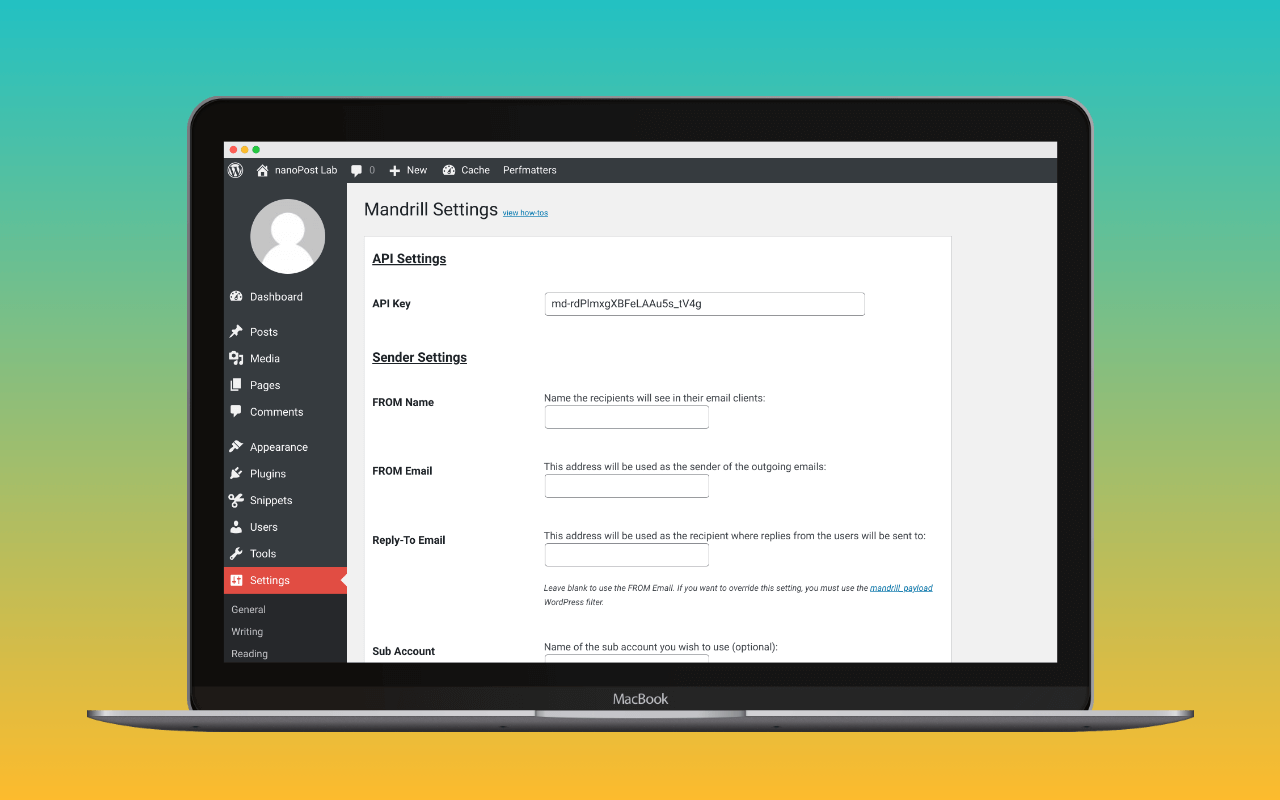
Send Emails with Mandrill is a single-provider WordPress mailer for Mailchimp Transactional Email, the service formerly sold as Mandrill. It replaces wp_mail() with a call to Mandrill’s HTTPS API, falls back to native wp_mail() when the API send fails, and exposes a small set of Mandrill-specific filters plus a static wpMandrill::mail() function for direct use from other plugins.
The plugin is a community fork maintained by Miller Media. The original wpMandrill plugin went unmaintained; Miller Media’s Matt Miller forked the abandoned codebase and has continued shipping releases under the Send Emails with Mandrill name. Active installs sit at 6,000+ on the wp.org listing, the listing rating is 5 out of 5 across 11 reviews, and the current release (1.6.2, February 2026) requires PHP 8.1 and tests up to WordPress 6.9. The code is GPL 2.0 and the public repository is at  Miller-Media/send-emails-with-mandrill.
The narrow case
Three paths connect a WordPress site to Mailchimp Transactional, and the choice between them is operational, not deliverability-related. All three reach the same infrastructure with the same authentication, sign with the same DKIM key, and meet the same SPF policy.
The first path is generic SMTP via any mailer plugin pointed at smtp.mandrillapp.com on port 587, authenticated with PLAIN or LOGIN, using a Mailchimp Transactional API key as the password. FluentSMTP, Post SMTP, WP Mail SMTP free and other mailers all handle this configuration. The credentials are interchangeable across them, so switching mailer plugins later requires no change to the Mandrill side.
The second path is WP Mail SMTP’s built-in Mandrill mailer, which calls the Mandrill HTTPS API directly rather than connecting over SMTP. The configuration is one API key with no host or port to set. This skips the SMTP handshake on every send and ties the integration to WP Mail SMTP specifically.
The third path is Send Emails with Mandrill. It also calls the API directly, and adds three capabilities that neither of the other paths offers: automatic per-message tagging by the originating WordPress hook, a mandrill_payload filter for per-send payload mutation, and a wpMandrill::mail() static function that other plugins can invoke without going through wp_mail() at all.
For most sites sending through Mandrill, the first path is the cleanest choice. Generic SMTP configuration is portable, easy to migrate off, and benefits from whichever mailer plugin’s logging and routing features the site already runs. Pick Send Emails with Mandrill only when one of three Mandrill-specific features is the reason for the install:
- Sites that need to alter the message payload before send (custom merge variables, per-recipient metadata, Mandrill template handles) use the
mandrill_payloadfilter, which has no portable equivalent. - Sites that want every WordPress email auto-tagged in the Mandrill dashboard by source hook (
wp_retrieve_password,wc_order_status_completed,comment_notification, and so on) get that classification for free; the generic paths send untagged. - Sites with custom plugins that send transactional email directly through
wpMandrill::mail()rather thanwp_mail()need this plugin to expose that entry point.
If none of these apply, install one of the generic mailers or use WP Mail SMTP’s built-in Mandrill option. A single-provider mailer is overhead when nothing in its API earns its place. (For the comparable case where a single-provider plugin does earn its install on capability grounds, see the Mailgun for WordPress review, where API-mode delivery over port 443 is the differentiator.)
Configuration
The API key is the configuration. Generate a Mailchimp Transactional API key in the dashboard under SMTP & API Credentials, then either enter it at Settings > Mandrill or define it as a constant in wp-config.php:
define( 'SEWM_API_KEY', 'your-api-key-here' );Defining the key in wp-config.php keeps it out of the WordPress database and out of any settings export. The Mailchimp marketing API key will not authenticate; the key has to be the Transactional one, generated in the Transactional dashboard area. The WP mail config generator returns a paste-ready define() block for the constant above once a Transactional key is on hand. Because Mandrill uses include:spf.mandrillapp.com and the mandrill._domainkey selector, the DNS auth checker reads how both resolve from the receiver’s perspective, so a stale nameserver or a mistyped selector shows up before the fallback-to-native wp_mail() path fires in production.
There is no allow-list or per-site exclusion in the free plugin: every wp_mail() call goes through Mandrill, and the only escape hatch is to set $message['force_native'] = true inside a mandrill_payload filter to route a specific send through native wp_mail() instead. Use this for emails that should not touch the transactional provider (an internal heartbeat to localhost, a notification that needs to ship from a different From domain than the site’s authenticated Mandrill identity).
The fallback to native wp_mail() triggers when the Mandrill API send fails. The fallback is a failure path, not a routing decision: a sending-domain authentication problem at Mandrill will not be fixed by handing the message to PHP’s mail() on the same host, and a host with no working mail() configuration will silently drop the fallback message. Most managed WordPress hosts (Kinsta, WP Engine, Pressable, Pantheon and others) block outbound mail() or restrict it to their own outbound relay; for sites on those hosts, the native fallback is theatre. The mechanism’s real value is for transient Mandrill API errors (an outage, a rate limit) on hosts where mail() actually works.
WP_DEBUG enables verbose plugin messages at each stage of the send process and surfaces the Mandrill API response on failure. Server-level error logs capture failed API responses regardless of WP_DEBUG. The free plugin has no admin log table of its own; the per-message activity log lives in the Mandrill dashboard with 30 days of retention.
Hooks and the wpMandrill static class
The integration surface is four named filters and one action. The wp_mail_native action is the observability hook for the fallback path described above: it fires every time a send falls through to native wp_mail(), which is the signal a logging or monitoring plugin needs to count failed Mandrill calls without parsing server logs.
| Hook | Purpose |
|---|---|
mandrill_payload |
Mutate the message payload before send. Setting $message['force_native'] = true skips Mandrill and uses native wp_mail() for that send. |
mandrill_nl2br |
Toggle the <br/> substitution applied to plain-text bodies per message. Used to exclude WooCommerce or password-reset emails from the rewrite. |
wpmandrill_enable_reports |
Disable the reports dashboard area programmatically. |
wpmandrill_enable_widgets |
Disable the admin dashboard widget programmatically. |
wp_mail_native (action) |
Fires when a send falls back to native wp_mail(). The observability hook for fallback events. |
A typical mandrill_nl2br filter, taken from the plugin’s own documentation, excludes password reset emails from the line-break rewrite by checking the automatic tags the plugin attaches to each message:
function disable_nl2br_for_password_resets( $nl2br, $message ) {
    if ( in_array( 'wp_retrieve_password', $message['tags']['automatic'], true ) ) {
        $nl2br = false;
    }
    return $nl2br;
}
add_filter( 'mandrill_nl2br', 'disable_nl2br_for_password_resets', 10, 2 );
The wpMandrill::mail() static function is the second integration surface. Custom plugins that want to send transactional email through Mandrill without invoking wp_mail(), and the entire WordPress mail pipeline behind it, can call wpMandrill::mail( $to, $subject, $message, $headers, $attachments ) directly. The case for this is concrete: a logging plugin or membership plugin that hooks wp_mail to mutate attachments or rewrite headers will run those filters every time wp_mail() is invoked, including for sends the calling plugin would rather ship untouched. wpMandrill::mail() bypasses the wp_mail filter chain entirely. Of the three Mandrill-specific features that justify this plugin over generic SMTP, this is the one with the cleanest fit-or-not test: if the codebase has a custom sender that needs to skip the wp_mail pipeline, the plugin earns the install on that ground alone.
Automatic tagging in the Mandrill dashboard
Every send is automatically tagged with the WordPress hook that triggered it: wp_retrieve_password for password resets, comment_notification for comment notifications, wc_order_status_completed for WooCommerce order emails, and so on. The tag appears in the Mandrill dashboard’s reporting and is filterable as a facet.
For a WordPress site with a mix of WooCommerce order emails, contact form submissions, comment notifications and password resets, this surfaces deliverability problems by source: a spike in wp_retrieve_password bounces is visible at a glance without reading individual log entries. None of the generic SMTP paths produce this classification. The tagging is a Mandrill API field, set by the plugin per send.
Two display limits apply at the dashboard layer. Daily statistics show data for the first 20 senders and the first 40 tags. A site running WooCommerce, a learning management system, a couple of form plugins and a membership plugin can clear 40 distinct sending hooks per day without trying; once it does, the daily breakdown truncates and the dashboard becomes incomplete as a per-source debugging tool. The underlying activity log still records every send; the truncation is a reporting-view limit, not a data loss.
Where it sits against the alternatives
Generic SMTP via FluentSMTP or Post SMTP brings free email logging in addition to the routing this plugin handles; WP Mail SMTP free does not log without the Pro upgrade. For sites that need a log of outbound messages and do not need the three Mandrill-specific features above, FluentSMTP or Post SMTP pointed at smtp.mandrillapp.com is the more complete answer than Send Emails with Mandrill plus a separate logger.
WP Mail SMTP’s built-in Mandrill mailer matches Send Emails with Mandrill’s setup cost (one API key, no host configuration) and is the shorter path for sites already on WP Mail SMTP. The trade-off is platform lock-in: the configuration is tied to WP Mail SMTP, does not carry over if another mailer is installed, and does not produce the dashboard tagging or expose the wpMandrill::mail() static function.
The remaining slot is for sites that need exactly what Send Emails with Mandrill provides and not the additional surface of a multi-provider mailer. Single-purpose, single-provider, three Mandrill-specific features, no logging table, no provider switching, no upsell.
The platform context
Send Emails with Mandrill is a thin layer on top of Mailchimp Transactional Email: if the platform is the wrong fit for the site, the plugin will not change that. Mailchimp Transactional has a $40/month minimum (a Mailchimp Standard plan at $20/month plus one 25,000-email block at $20), and the per-message economics only become competitive above roughly 100,000 emails per month. For WordPress sites under that volume that are not already running Mailchimp for marketing, Postmark, SMTP2GO and Brevo are usually the better defaults.
See nanoPost’s Mailchimp Transactional Email service review for the full pricing comparison and DNS authentication setup. That review covers the “should we use Mandrill at all” question; this one covers “we are using Mandrill, what plugs us in”.
Assessment
Miller Media maintains the code actively. The wp.org listing shows steady releases through 2026 (1.6.2 in February, security and PHP 8.2 deprecation work in the preceding 1.4.x line), the PHP 8.1 / WordPress 6.9 baseline matches a current managed-hosting environment, and the GPL 2.0 licence and public repository keep the option to fork further if Miller Media steps back. The plugin is one of the few single-provider mailers in the WordPress ecosystem that survives the discontinue-the-original cycle on community maintenance rather than vendor renewal, and the maintenance record is the part of the case that has changed most since the original Mailchimp release.
The plugin does not change the case for Mailchimp Transactional itself. That decision lives one layer up.
Verification
This review verified the plugin’s current version, install count, listing rating, PHP and WordPress requirements, hook list, code example, and changelog against the wp.org listing at wordpress.org/plugins/send-emails-with-mandrill/, the readme.txt and source in the Miller-Media/send-emails-with-mandrill GitHub repository, and the publication’s own Mailchimp Transactional Email service review for platform-level claims. Plugin data as of August 2026; tested against version 1.6.2 (wp.org last-updated 2026-02-17). Mailchimp Transactional (Mandrill) re-verified as an active Mailchimp product at mailchimp.com/developer/transactional/.
For the broader setup the plugin slots into, see how to set up WordPress email.