
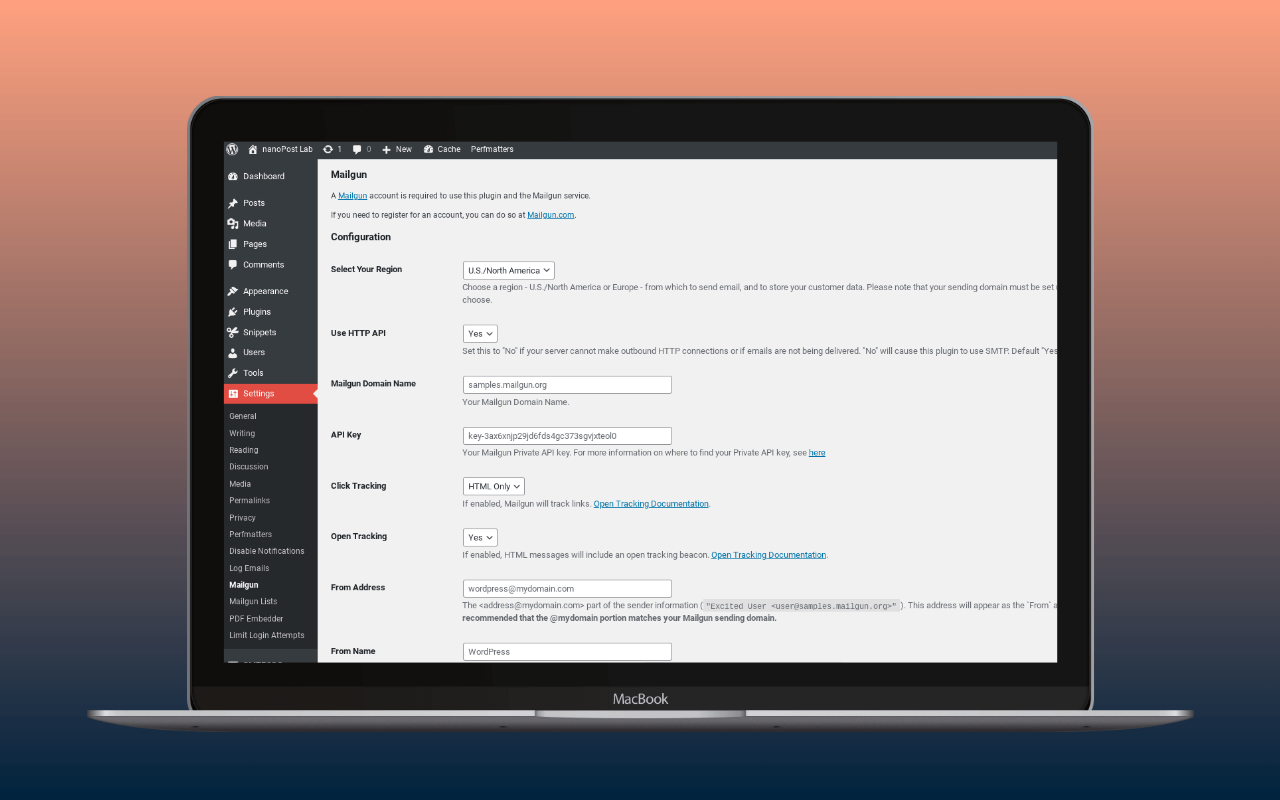
Mailgun for WordPress is the official plugin for routing wp_mail() through Mailgun’s infrastructure. Sinch (which acquired Mailgun via Pathwire in 2020) maintains it. The plugin is free; Mailgun’s sending service is not.
The plugin’s reason to exist is API-first delivery. Configure an API key and a sending domain, and WordPress email leaves via Mailgun’s HTTP API over port 443 rather than SMTP. On shared hosting – where outbound connections on ports 25, 465, and 587 are frequently blocked – this is the relevant path. The official plugin is the most direct way to reach Mailgun’s API from WordPress, and for operators who have already chosen Mailgun, it is the right default unless one of the alternatives below fits the site’s needs better.
API mode and SMTP mode
The settings page offers two transports: Mailgun’s HTTP API (the default) and SMTP relay. The practical difference is port exposure. API mode sends over HTTPS to api.mailgun.net (US) or api.eu.mailgun.net (EU); SMTP mode connects to smtp.mailgun.org on port 587, 465, or 2525.
API mode is the better choice on shared hosting. HTTPS on port 443 is rarely blocked; SMTP on 587 frequently is. On corporate or managed hosting environments with strict egress firewalls, HTTPS connections to Mailgun’s API endpoints can also be blocked – less common than SMTP blocking, but not a hypothetical. If API mode fails silently on a locked-down host, try SMTP mode with port 2525, which some providers leave open when 587 and 465 are restricted.
API-mode failures may not surface through the wp_mail_failed hook. The plugin’s documented developer hooks (mg_use_recipient_vars_syntax, mg_mutate_message_body, mg_mutate_attachments) do not include a delivery failure hook. SMTP failures generate PHP-level errors that WordPress captures through its standard hook; the API path does not guarantee the same. If email failure alerting through a third-party plugin depends on wp_mail_failed, verify the hook fires correctly with API mode before relying on it in production.
SMTP credentials for the relay transport use per-domain values, not the account API key. The username and password are found in the Mailgun dashboard under the sending domain’s settings. The WP mail config generator takes a Mailgun API key and sending-domain pair and returns a paste-ready block for the plugin’s API-mode settings (or per-domain SMTP username and password for SMTP mode), so the API-Security-and-Domains dashboard traversal becomes a single copy step. Once the sending domain is verified, the DNS auth checker reads how include:mailgun.org and the Mailgun DKIM CNAME resolve from the receiver’s perspective, so a stale nameserver or a mistyped selector shows up before real traffic does.
Region selection
The plugin exposes a region toggle: US (default, api.mailgun.net) or EU (api.eu.mailgun.net). Mailgun’s EU infrastructure processes and stores email data within the EU, relevant for operators with GDPR data-residency requirements. The toggle maps to a different API endpoint; plugin functionality is otherwise identical across regions.
Tracking and tagging
The plugin exposes Mailgun’s open and click tracking globally – toggle them on or off in the settings page, with a separate control to suppress click tracking in password reset emails (added in version 2.1.0). Tagging attaches Mailgun tags to outgoing messages. In practice, a developer can tag password reset emails separately from WooCommerce order confirmations and filter Mailgun’s event dashboard by tag – without exporting all events or writing custom PHP.
These controls exist in the official plugin. FluentSMTP’s Mailgun integration connects via the same API but does not expose tracking toggles or per-message tagging in its settings. WP Mail SMTP’s Mailgun settings cover API key, domain, and region, without Mailgun-specific tracking or tagging parameters. The official plugin is the only free option that exposes these controls from within WordPress admin.
What the plugin does not do
The plugin is a sender, not a console. Mailgun dashboard features the plugin does not surface:
- Email logs and delivery events (visible at
app.mailgun.com) - Bounce and suppression management
- Inbound routing configuration
- Webhooks and event subscriptions
- Email validation API
- Template management
The plugin also does not include email logging on the WordPress side. If a site needs a local record of every email sent through WordPress, the plugin does not provide it. Mailgun’s dashboard provides event data for 5 days (Foundation plan) or 30 days (Scale), but that is Mailgun-side visibility, not a local WordPress log. For local email logging without a paid plan, FluentSMTP and Post SMTP both include it free.
The settings page includes a test-send function that sends a message through the configured transport and reports the result.
WordPress Multisite
The plugin supports global configuration via wp-config.php constants, which apply across all sites in a Multisite network:
define('MAILGUN_APIKEY', 'key-xxxxxxxxxxxx');  // from Mailgun dashboard > API Security
define('MAILGUN_DOMAIN', 'mg.yourdomain.com'); // your verified sending domain
define('MAILGUN_USEAPI', true);                // false to use SMTP relay instead
define('MAILGUN_REGION', 'us');                // or 'eu' for EU API endpoint
Additional constants MAILGUN_TRACK_CLICKS and MAILGUN_TRACK_OPENS (boolean) control tracking globally when set via wp-config.php. When constants are defined, the settings page displays them as read-only. Network administrators managing a Multisite can centralise sending configuration this way without exposing credentials through the admin UI.
Mailgun pricing
Mailgun for WordPress is free to install. Using it costs money.
Mailgun has no permanent free tier. New accounts receive a time-limited trial, but ongoing use requires a paid plan. For current trial terms and the full plan comparison, see nanoPost’s Mailgun sending-service review. The entry plan starts at $15/month (Basic, 10,000 emails), scaling to $35/month (Foundation, 50,000) and $90/month (Scale, 100,000).
The practical implication: there is no path to free Mailgun sending for an established site. Operators evaluating whether Mailgun is the right fit should start at the service review, not the plugin page.
The official plugin vs multi-provider alternatives
Three multi-provider mailer plugins include a native Mailgun integration in their free tiers, using the same HTTP API:
- WP Mail SMTP – Mailgun via API, no logging in the free version (Pro at $99/year).
- FluentSMTP – Mailgun via API, includes email logging free.
- Post SMTP – Mailgun via API, includes email logging free; Pro adds mobile alerts on failure.
Because all three connect through the Mailgun HTTP API, they share the main technical advantage of the official plugin: HTTPS transport that sidesteps SMTP port blocks.
The choice comes down to two factors:
Tracking and tagging. The official plugin exposes Mailgun’s tracking toggles and message tagging; the multi-provider alternatives do not. If filtering Mailgun delivery events by WordPress email type matters, the official plugin is the only free option that wires it up.
Email logging. The official plugin does not log email on the WordPress side. FluentSMTP and Post SMTP do, for free. WP Mail SMTP gates logging behind the Pro plan. For a site where the operator needs a local record of what was sent, the official plugin is the wrong choice.
For most Mailgun-committed sites that do not need tracking/tagging control and do want local logging, FluentSMTP is the better default. For sites where Mailgun-specific tracking and tagging matters, the official plugin is the right pick.
Assessment
The official Mailgun for WordPress plugin serves one audience well: operators who have already chosen Mailgun, want direct vendor-maintained integration with tracking and tagging control, and do not need local email logging in the free tier.
The cases where a multi-provider alternative is the better choice:
- Local email logging needed free: FluentSMTP or Post SMTP.
- May switch providers later: any multi-provider mailer absorbs the change without a plugin swap.
- Non-technical setup: WP Mail SMTP’s setup wizard is the most guided onboarding in the category.
For sites still deciding whether Mailgun’s pricing fits the sending volume, that decision comes before the plugin decision.
For the broader setup the plugin slots into, see how to set up WordPress email.
Plugin capabilities reviewed against wordpress.org/plugins/mailgun documentation, version 2.2.2 (last updated 2026-07-17, tested up to WordPress 7.0.3). Pricing figures link to nanoPost’s Mailgun sending-service review (verified 2026-06-12). Tracking/tagging comparison against FluentSMTP and WP Mail SMTP Mailgun integrations checked 2026-08-11.