
Use Resend as the outbound mailer for a WordPress site when the site’s monthly volume fits inside the 3,000-a-month free tier, the operator wants a purpose-built email dashboard and per-domain API keys rather than a cloud console, and the site can accept a 100-a-day cap that turns into a real ceiling on busy sales days. Above the free tier, Resend’s Pro plan is $20 a month for 50,000 emails or $35 for 100,000, which is meaningfully cheaper than Postmark‘s per-message rate at the mid-volume bracket and gives most WordPress sites a comfortable steady-state home.
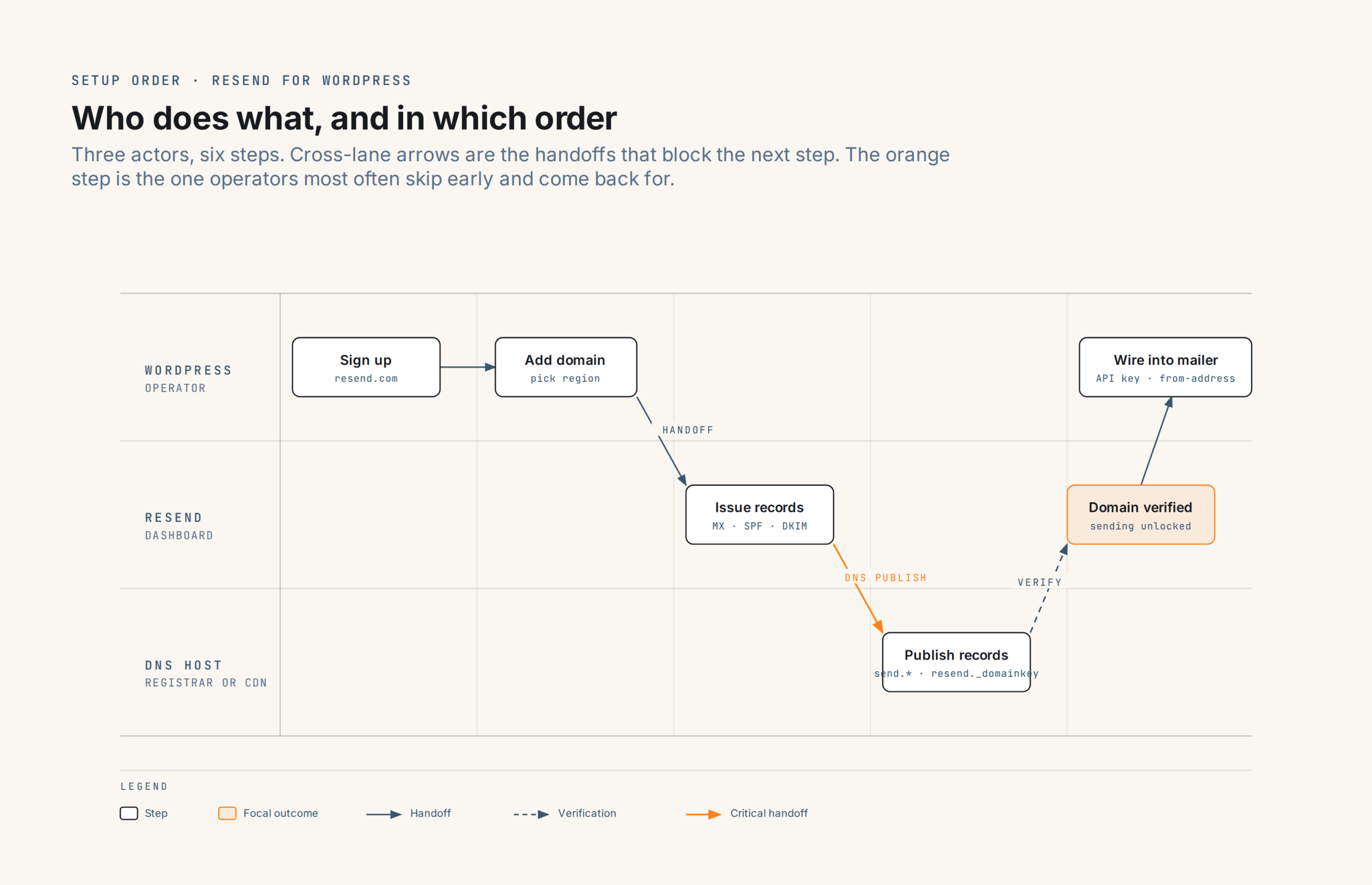
Setup runs in a fixed order: sign up, pick a region, add the sending domain, publish three DNS records (one MX, one TXT for SPF, one TXT for DKIM) and wait for verification, generate an API key, then wire the key into WordPress through one of three plugin paths. The plugin path is the one place the sequence forks: WP Mail SMTP‘s free tier includes a native Resend mailer that submits over the API, the  Send Emails with Resend plugin by CloudCatch is a single-purpose alternative that does the same job with a smaller footprint, and any generic-SMTP plugin can reach Resend at
 smtp.resend.com. This guide walks all three.
Companion coverage for the entity view sits at Resend as a WordPress SMTP server; for the AWS-shaped alternative, WordPress SMTP with Amazon SES.
When Resend is the right approach
Resend is a transactional-email API with a WordPress-native mailer path and a dashboard built for the send-side question. It fits sites whose profile matches those constraints:
- Volume up to about 100,000 messages a month. Free covers 3,000, Pro covers 50,000 or 100,000 depending on the variant, and Scale opens at 100,000 for $90. Above roughly 500,000 a month the arithmetic starts to favour Amazon SES despite the AWS setup tax.
- Operator preference for a purpose-built email dashboard over a general-cloud console. Resend’s dashboard answers the routine “did yesterday’s password resets go out” question inside a login rather than a CloudWatch query.
- Comfort with API keys and per-domain permissions rather than IAM users and roles. Key rotation is a dashboard action.
- A site whose transactional volume distributes evenly across the month, or a Pro plan that lifts the daily cap. The free-tier 100-a-day ceiling matches the monthly average exactly and leaves no headroom for a WooCommerce store having a busy day.
- No strict EU-only data-residency requirement. Sending happens in the region assigned to the domain; account information sits in the US regardless, per the note under Regions and identity below.
When any of these flip, one of the entries in SMTP services for WordPress is a better fit. In particular, a site already running Postmark, SES, or SMTP2GO with clean historical deliverability data has no operational reason to migrate; switching providers has a cost and Resend’s advantages are not so large they overcome it for an already-working setup.
Choosing a mailer plugin
Three practical paths reach Resend from WordPress. Two are Resend-aware, one is generic.
WP Mail SMTP’s Resend mailer is included in the free tier. Selecting Resend as the mailer replaces WordPress’s wp_mail() handler with a direct call to Resend’s REST API, bypassing SMTP altogether. The plugin asks for an API key (WP Mail SMTP’s setup docs require a full_access key so the plugin can read Resend’s deliverability-status endpoints back into its own dashboard), a from-address at the verified domain, and an optional from-name. Domain verification happens in the Resend dashboard, not the plugin; WP Mail SMTP will refuse to send a test email until the plugin’s Resend page reports the domain as verified upstream. Because the path is API-over-HTTPS, hosts that block outbound port 587 are not a problem.
Send Emails with Resend by  CloudCatch is a smaller, single-purpose plugin at 1,000+ active installs, tested against WordPress 6.9.7 as of the current 1.3.0 release. It swaps out PHPMailer for a direct Resend API call and offers one settings page: paste an API key, save. It is an unofficial, community-maintained plugin (CloudCatch is not listed as a Resend partner), but the plugin does exactly one job and does it cleanly. This is the path for operators who want Resend without the logging, backup connections, and alerts a general SMTP plugin carries.
Generic SMTP through any mailer plugin, including FluentSMTP, Post SMTP, Easy WP SMTP, or the bundled SMTP support inside a forms plugin. Resend has no dedicated mailer in FluentSMTP’s provider list as of mid-2026, so the FluentSMTP path is generic SMTP via the “Any SMTP” connection using the settings table further down this page. This works, is free, and is the right choice for operators who already have a mailer they trust and just need to point it at a new backend.
Any of the three delivers the same mail. The choice comes down to how much you want the mailer plugin to do beyond sending. WP Mail SMTP adds email logging, a backup connection, and notifications; CloudCatch’s plugin keeps the footprint small; generic SMTP keeps the setup portable across providers when a future migration is on the table.
Signing up and adding the domain
Create a Resend account at  resend.com; no credit card is required for the free tier. The dashboard opens on the Emails view with a default team already created.
Before adding a domain, pick the region the domain will send from (see Regions and identity below). The region choice sets the DKIM record targets and the SMTP send location, and changing it later means removing and re-adding the domain.
In the dashboard, Domains → Add Domain. Enter the sending domain (root or subdomain), select the region, and Resend generates the DNS records to publish. The domain enters a “Not started” verification state until every required record resolves.
Publishing the DNS records
Three records are required for sending. A fourth is optional, for inbound receiving via Resend’s inbound endpoint.
MX record for the Return-Path subdomain. Hostname send.yourdomain.com (or the equivalent with your subdomain), pointing at a region-specific host such as feedback-smtp.us-east-1.amazonses.com with priority 10. This is the address bounce notifications flow back to. Resend sends on Amazon’s SES infrastructure, which is why the target host resolves to an AWS one.
TXT record for SPF at the Return-Path subdomain. Hostname send.yourdomain.com, value v=spf1 include:amazonses.com ~all. This authorises Resend’s sending infrastructure for the Return-Path address; because it lives at the send subdomain rather than the root, an existing root-domain SPF record for a mailbox provider (Google Workspace, Microsoft 365, or the like) is left alone.
TXT record for DKIM. Hostname resend._domainkey.yourdomain.com, value the public-key blob Resend supplies (a long string beginning p=). Selector is resend.
Verification often completes within 15 minutes on major DNS hosts (Cloudflare, Route 53, registrar-native DNS). Resend’s docs give a 72-hour ceiling for slower providers whose propagation trails. Domain status flips to Verified in the dashboard once all three records resolve; the dashboard also shows which specific record is missing when verification is still pending.
Creating an API key
Once the domain is Verified, generate an API key at Settings → API Keys → Create API Key. Two permission levels are documented:
full_accessallows the key to send mail and to manage domains, other keys, contacts, audiences, and broadcasts. This is what WP Mail SMTP’s Resend mailer requires, because it reads the domain-verification status and other account state back through the same key.sending_accessrestricts the key to sending mail only. This is the correct choice for the Send Emails with Resend plugin and for generic-SMTP setups, and for any agency-issued key that should not be able to reshape the account.
A sending_access key can additionally be scoped to a single verified domain via the domain restriction in the create-key dialog. That is the primitive an agency wants: one key per client site, each key unable to send from any other client’s domain.
The token is displayed once at creation in the format re_...; copy it immediately, because the dashboard cannot show it again. Keys can be deleted and replaced at any time.
Configuring the mailer plugin
The API-key path (WP Mail SMTP’s Resend mailer, or CloudCatch’s Send Emails with Resend) is a two-field setup: paste the API key, set the from-address at the verified domain. Neither plugin needs the SMTP settings.
The generic-SMTP path uses these values, identical across every mailer plugin.
| Setting | Value |
|---|---|
| Host | smtp.resend.com |
| Port | 587 (STARTTLS, recommended) or 465 (SSL/TLS) |
| Encryption | STARTTLS for 587, SSL/TLS for 465 |
| Authentication | Login (PLAIN) |
| Username | resend (the literal string, not the account email) |
| Password | The Resend API key (re_...) |
The username trips up the first-day operator new to Resend: it is always the literal resend, never the account’s login email or a per-user identifier. Ports 25, 2465, and 2587 also work (25 and 2587 explicit-TLS, 2465 implicit-TLS), which is useful when a WordPress host blocks the common ports. Port 25 is blocked on almost every shared and managed WordPress host and is not the right choice even where it’s open.
Send a test email from the plugin’s built-in test tool once configured. WP Mail SMTP and Send Emails with Resend both surface the Resend API’s error responses directly, which makes a mistyped key or an unverified from-address easy to spot.
SPF, DKIM, and DMARC alignment
Resend sends mail whether or not DMARC alignment is set up on the receiver side. Whether that mail survives a moderately strict DMARC policy at the receiver depends on the same three records covered above, plus a note on the from-address.
SPF. Aligns via the send subdomain because that is where the Return-Path lives. A receiver checking mailfrom against d=yourdomain.com finds a pass on send.yourdomain.com and treats SPF as aligned to the organisational domain.
DKIM. The resend._domainkey public key signs each outgoing message. A receiver retrieves the record, verifies the signature, and reports dkim=pass with d=yourdomain.com. If the DKIM record fails to resolve (typo in the DNS value, wrong subdomain, provider stripping the record), signing continues to fail silently and mail can still land in some inboxes on SPF alone; DMARC will flag it.
DMARC. The _dmarc.yourdomain.com record is the domain owner’s policy for what receivers do with mail that fails both SPF and DKIM alignment. p=none reports without quarantining, which is the safe starting point. DMARC is not Resend-specific and is not required by Resend itself, but Gmail and Yahoo require a DMARC record on any domain sending above 5,000 messages a day. A first-pass record at _dmarc.yourdomain.com of v=DMARC1; p=none; rua=mailto:[email protected] reports without quarantining; tighten to p=quarantine or p=reject after a few weeks of clean reports. The full DMARC treatment lives in DNS setup for WordPress email.
The from-address must be at a verified domain. [email protected] or a purpose-specific [email protected] are both fine. A from-address at any other domain returns an error at send time; this is Resend’s guard against a compromised WordPress site trying to spoof a third party’s domain.
Verifying the setup
The lightest end-to-end test is the WordPress password-reset flow on a test account.
- From a logged-out browser, visit
/wp-login.phpand click “Lost your password?”. - Enter the test account’s email address. WordPress sends a reset email via Resend.
- Confirm the message arrives within a minute or two, and check the headers for
dkim=passwithd=yourdomain.comanddmarc=pass. Gmail’s “Show original” shows the header values in full.
A test that returns a plugin-side authentication error is almost always a mistyped API key or a from-address at an unverified domain; the plugin’s error output identifies which of the two. A test that leaves the site but does not arrive at the recipient is a DNS or reputation issue rather than a plugin issue; the Resend dashboard’s Emails view shows every attempted send with a status (sent, delivered, bounced, complained), which is the first place to look.
For deeper triage, troubleshoot WordPress email and how to read an SMTP session log cover the failure modes that survive the basic checks.
Limits and rate caps
The free tier’s ceilings are the numbers most likely to force a plan upgrade.
| Limit | Free | Pro (from $20/mo) |
|---|---|---|
| Monthly volume | 3,000 emails | 50,000 (from $20) or 100,000 (from $35) |
| Daily volume | 100 emails | No daily cap |
| Verified domains | 3 | 10 |
Log retention is 30 days on the free tier; the paid-plan retention figure is not published on Resend’s pricing page as of the verification date on this piece, so check the dashboard’s Emails view for the current window on a Pro or Scale account.
The 100-a-day cap on Free is the practical ceiling for WooCommerce. A store averaging 60 orders a day with a busy day of 150 will hit the cap before lunchtime and defer or reject the excess. Pro removes the daily cap and settles the rate against Resend’s account-wide 10 requests per second, which is not something a WordPress site sends at without an actively-abused contact form.
Scale (from $90 for 100,000 messages, up to $1,150 for 2.5 million) opens dedicated-IP eligibility as a $30/month add-on at 3,000-a-day sending or above, and raises the domain cap to 1,000. Enterprise is negotiated; the practical trigger is a data-residency requirement that Scale cannot satisfy, or a compliance contract requiring dedicated infrastructure.
Overage on paid tiers is pay-as-you-go, hard-capped by default at five times the monthly quota to prevent runaway billing. Support can raise the cap on request. The Pro overage rate is $0.90 per 1,000 emails, so a Pro-$20 account sending 75,000 messages settles at $20 plus $22.50 in overages, or $42.50; the Pro-$35 variant covers the same volume inside the base plan and is the cheaper pick for predictable mid-volume sending month over month.
Regions and identity
Region choice is a decision made at domain-add time, and one that carries setup weight because changing it later means re-verifying.
Four regions are available: North Virginia (us-east-1), Ireland (eu-west-1), São Paulo (sa-east-1), and Tokyo (ap-northeast-1). Pick the region closest to the recipient audience: an EU-audience site sends from Ireland, a Brazilian-audience site from São Paulo, an Asia-Pacific site from Tokyo. The North Virginia region is the sensible default for everything else. Sending from a distant region adds SMTP handshake latency without a compensating benefit.
Changing a domain’s region is a coordinated cutover: remove the domain from Resend, add it again in the new region, update the three DNS records to match the new region’s targets, and re-verify. Do it once at setup, not later, unless a business change forces the move.
Account information (billing, team membership, API-key catalogues) is stored in the United States regardless of sending region. A site with a strict EU-only data-processing requirement should confirm the current Resend data processing agreement covers the account-level metadata split before committing.
When to migrate away
Resend suits most WordPress sites for the long run. Three signals mean it has stopped being the right fit.
- Volume is comfortably above 500,000 messages a month with no sign of settling back. Amazon SES‘s $0.10-per-thousand pricing compounds into real savings at that scale, and the AWS setup tax has amortised.
- The site needs first-party analytics beyond delivered/bounced/complained. Resend’s dashboard covers the routine send-side questions; a marketing team wanting open-rate cohorts by campaign is better served by Brevo or Mailgun, which sit closer to the marketing-plus-transactional shape.
- A compliance contract requires infrastructure Resend does not offer on the current plan. Dedicated IPs open at Scale with a 3,000-a-day sending floor; a contract requiring one below that volume forces a different provider.
The catalog is at SMTP services for WordPress and the wider setup context sits in the WordPress email setup ultimate guide. Three shortlist candidates for the migration case: Postmark for transactional-only under 100,000 messages a month; SMTP2GO for a permanent free tier and predictable pricing at moderate volume; Amazon SES for high-volume transactional at the per-message rate.
References
Resend primary sources:
- Resend SMTP and Resend Domains
- Resend API keys and Create API Key API reference
- Resend regions and Add a domain
- Resend pricing and Resend webhooks
Mailer plugin setup:
 WP Mail SMTP: Resend mailer
Sibling nanoPost coverage:
- Resend as a WordPress SMTP server, the entity entry with the structured spec, pricing, and fits/doesn’t-fit framing.
- DNS setup for WordPress email, the general SPF / DKIM / DMARC tutorial.
- WordPress SMTP with Amazon SES, the AWS-shaped alternative when Resend outgrows the site.
- WordPress email setup ultimate guide, the section overview this guide is the destination for.
- Troubleshoot WordPress email and how to read an SMTP session log, triage.