
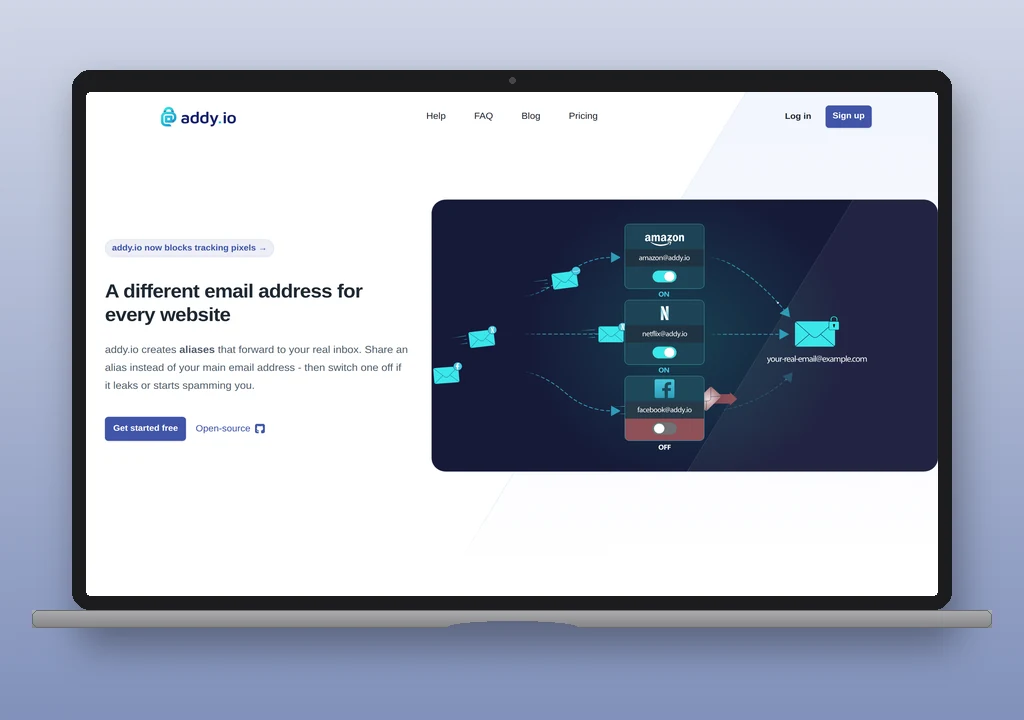
addy.io is an email aliasing service in the same category as SimpleLogin – purpose-built for creating a fresh, disposable email address for every service a person signs up to, and routing the mail back to a real inbox. It is fully open-source under AGPL-3.0, self-hostable on a Docker host if the operator prefers to run their own infrastructure, and independent – founded and maintained by Will Browning out of the UK. addy.io is the current name for AnonAddy; the product, the team, and the mail path are unchanged.
The service occupies a specific niche within the wider forwarding category. Where ImprovMX and Forward Email are built for the “one domain, a handful of role addresses” case (admin@, support@, contact@ all landing in the operator’s real inbox), addy.io is built for the “one unique alias per service” case. For a WordPress operator who wants that model, addy.io’s $3/month Pro tier is the independent-provider default in the privacy-aliasing subclass; the trade-off against SimpleLogin gets weighed in the Verdict.
Shared-domain aliases vs standard aliases
addy.io has two kinds of alias, and the distinction matters before pricing starts to make sense.
Shared-domain aliases sit on domains addy.io owns and operates – @anonaddy.me, @anonaddy.com, and a handful of other premium domains published only inside the dashboard. Anyone can create them without owning a domain, they’re tier-limited (10 on Free, 50 on Lite, unlimited on Pro), and they work out of the box with zero DNS setup. These are the throwaway addresses for signing up to a form once, or for testing a service before committing.
Standard aliases sit on the operator’s own custom domain (or a personal username subdomain of addy.io), and they’re unlimited on every paid tier. They require the DNS setup covered below, they carry the operator’s brand rather than addy.io’s, and they’re what a WordPress operator wants to run signups through long-term. [email protected], [email protected], and so on all resolve through the operator’s own DNS and forward via addy.io’s mail servers to the destination inbox.
For an operator who just wants to try the service, the shared-domain aliases on the Free tier are enough to see the flow work. For any deployment where the alias needs to look professional or where the operator wants durable per-vendor addresses, the paid tier with a custom domain is the real starting point.
Where addy.io fits in a WordPress stack
addy.io handles inbound routing for custom domains and personal aliasing. For a WordPress operator, three uses are typical.
The first is per-vendor aliases for the sites and services the operator signs up to as part of running the business – the hosting control panel, the CDN dashboard, the plugin licence portals, the analytics tools. [email protected], [email protected], [email protected] each become a unique alias that forwards to the real inbox. If one of those vendors leaks or sells the list, the operator sees which alias got the spam and can shut it off without disturbing the others. This is the original aliasing use case, and it works well for a solo operator or a small agency running a handful of client accounts.
The second is contact-form endpoints. Instead of hardcoding [email protected] into every client site, generate a unique alias per site and route them all through addy.io. When a client relationship ends, the alias gets disabled without touching the client’s site or the operator’s inbox.
The third is the reverse – initiating email from an alias, so the reply to a vendor arrives at the alias rather than at the real inbox. This is where the anonymous reply and send-from-alias mechanism matters, and it’s covered separately below.
addy.io is not a WordPress transactional relay. There is no SMTP submission endpoint for wp_mail() traffic, no per-domain sending reputation to manage, and no bulk-send capacity. WordPress sites should use a dedicated sending service (Postmark, SMTP2GO, Mailgun) for transactional email, and treat addy.io as the inbound-routing layer alongside it.
addy.io is also not a mailbox provider. Mail arrives at addy.io’s servers and forwards to whatever real inbox the alias points at – typically Gmail, Fastmail, Proton Mail, or Google Workspace. The alias itself has no stored mailbox, no IMAP access, no webmail. If the operator wants a real mailbox at [email protected] with IMAP and stored history, that comes from Fastmail, Google Workspace, Proton Mail, or Forward Email; addy.io sits in front of it, not in place of it.
Pricing
The Free tier is a genuine trial: 10 shared-domain aliases, one destination mailbox, no custom domains, and a 10 MB monthly bandwidth ceiling on forwarded mail. It’s enough to create a handful of @anonaddy.me aliases and confirm the flow works, but it does not carry a WordPress deployment – the lack of custom-domain support alone rules it out for any real use.
The paid tiers, billed annually:
| Tier | Annual | Custom domains | Recipients | Shared aliases | Reply/send per day |
|---|---|---|---|---|---|
| Free | $0 | 0 | 1 | 10 | 0 |
| Lite | $1/mo | 1 | 5 | 50 | 50 |
| Pro | $3/mo | 20 | 30 | Unlimited | 200 |
Monthly billing is available on Pro and above ($4/month), roughly a 33% premium over the annual price. Standard aliases on a custom domain are unlimited on both Lite and Pro; the tier limits meter the shared-domain aliases, recipients, and bandwidth rather than the aliases that live on the operator’s own domain.
Lite at $1/month is unusual in the category – cheap enough for a single hobby project without a second thought, with one custom domain and 50 shared aliases covering a small site’s role-address needs plus a personal aliasing habit. Pro at $3/month is the tier a WordPress operator running multiple sites will land on, since one custom domain quickly becomes a constraint. Duo ($4.50/mo annual, two Pro accounts) and Family ($7.50/mo, five) extend Pro for households or small agencies where each person wants their own aliasing setup – accounts fully separate, only the billing shared.
Pricing verified against  addy.io/#pricing on 2026-09-03; all prices in USD.
DNS setup
Setting up a custom domain runs in two phases: verify ownership, then wire up the mail records.
Verification is a single TXT record – addy.io generates a unique aa-verify=<token> value in the dashboard, the operator publishes it as a TXT record at the domain root, and addy.io confirms it within a minute or two.
Mail records handle inbound forwarding. The values, taken from addy.io’s custom-domain guide:
| Record type | Host | Value | Priority |
|---|---|---|---|
| MX | @ |
mail.anonaddy.me. |
10 |
| MX | @ |
mail2.anonaddy.me. |
20 |
| TXT (SPF) | @ |
v=spf1 include:spf.anonaddy.me -all |
– |
| CNAME (DKIM) | dk1._domainkey |
dk1._domainkey.anonaddy.me. |
– |
| CNAME (DKIM) | dk2._domainkey |
dk2._domainkey.anonaddy.me. |
– |
| TXT (DMARC) | _dmarc |
v=DMARC1; p=quarantine; adkim=s |
– |
The MX records alone are enough for inbound forwarding to work. The SPF, DKIM CNAMEs, and DMARC record are only required if the operator wants the anonymous reply and send-from-alias features to authenticate correctly – without them, replies from the alias may land in spam or be rejected outright by strict receivers like Gmail and Microsoft 365.
Two details matter here. First: the mail infrastructure sits under anonaddy.me even though the product rebranded to addy.io. That is a stable, intentional split – the mail path did not need to rename with the product, and rebranding it would have broken every existing DKIM CNAME. Second: the MX records take over the domain, so any existing MX records must be removed first – additive on a domain that has never handled mail, a migration on a domain currently on Google Workspace or Proton Mail.
If the domain already has an SPF record (common when a sending service is already handling wp_mail()), add the addy.io include before the terminator: v=spf1 include:spf.mtasv.net include:spf.anonaddy.me -all (the Postmark include is shown here as the sending example; substitute the operator’s actual sender).  SPF permits up to 10 DNS lookups per RFC 7208; the addy.io include consumes one.
Anonymous reply and send-from-alias
The anonymous reply mechanism is what separates aliasing services from pure forwarding services, and it’s the mechanic to understand before committing to the model. The user-facing behaviour: reply to a forwarded message from the normal inbox, and the reply arrives at the original sender as if it came from the alias, not from the real inbox address.
How it works underneath: when addy.io forwards [email protected] → [email protected] → the destination inbox, it rewrites the From: header to a per-contact anonymous address (something like [email protected]). When the operator hits reply, the message goes to that address. addy.io’s server receives it, looks up which real alias and which contact it corresponds to, then re-sends the message from the alias to the vendor. The vendor sees mail from [email protected] and has no visibility into the destination inbox.
The point of the aliasing threat model lands here: the real inbox address is never exposed to services the operator interacts with through aliases. It also means the operator can revoke an alias at any point without needing to change or forward from a different address; the alias goes away and the vendor’s mail stops arriving.
Reply/send is a paid feature: Free is zero replies per day, Lite is 50, Pro is 200. For per-vendor aliasing the limits are generous, since a per-vendor alias rarely triggers a reply (the point is one-way signup email). A shared support alias routing through addy.io is the case where 50/day can bite; sustained inbound support volume routes better through a dedicated helpdesk address.
Self-hosting
addy.io is one of the two services in this category with first-class self-hosting support. The full application is AGPL-3.0 on GitHub at  anonaddy/anonaddy, and a maintained Docker image packages the app with Postfix and Rspamd for the mail path. A docker-compose deployment wires that image up alongside its external dependencies – MariaDB or MySQL, Redis, and a reverse proxy (Traefik in the reference stack, or Nginx if the operator prefers) – each running in its own container. A
 SELF-HOSTING.md in the main repo documents the manual deployment path for operators who want to build the stack directly on a host rather than through compose.
An operator running their own instance handles Postfix, DKIM key rotation, MX and DNS setup for their alias domains, TLS certificates, and ongoing security updates directly. Self-hosting also loses the hosted service’s centrally-managed abuse handling and blocklist maintenance, and the browser extensions’ and mobile apps’ hosted-account integration. Not a small commitment – but the option exists for operators who don’t want a third party in the mail path at all.
The AGPL licence is worth reading in full for anyone considering commercial self-hosting; the copyleft provisions extend to network-served applications, meaning modifications must be shared back if the modified instance is offered as a service to other users. For a solo operator or a single-team internal deployment, this is not a constraint. For an agency planning to resell addy.io as a service under their own brand, it is. For most operators the hosted Pro tier at $3/month is the pragmatic choice; self-hosting is a real fallback rather than the default.
Where addy.io sits versus SimpleLogin
Within the privacy-aliasing subclass of forwarding services, addy.io and SimpleLogin are the two serious options. Both offer unlimited standard aliases on custom domains, anonymous reply and send-from-alias, self-hosting under AGPL, and reasonable pricing on the paid tier. Feature parity is high enough that this decision is rarely made on capabilities; the split is structural. addy.io is independent, founder-owned, and $3/month for Pro, with no bundled products and no acquisition history. SimpleLogin operates under Proton AG in Switzerland at $4/month, comes with Proton Pass Premium bundled, and benefits from Proton’s payments infrastructure (including Bitcoin and Monero). Operators who already use Proton products land on SimpleLogin as the natural default; operators who prefer independent providers, want to avoid concentrating multiple services under one company, or simply want the cheaper standalone option land on addy.io.
Neither is well-positioned for the “many role addresses on one domain” use case that ImprovMX and Forward Email are built for. If the operator needs admin@, support@, and sales@ on yourdomain.com all forwarding to the same inbox, the generalist forwarding services handle that more naturally. Aliasing services can do it, but the mental model is per-vendor uniqueness, not shared role addresses, and the tier limits and dashboards reflect that.
Verdict
For a WordPress operator who wants per-service aliases as a habit – a different email address for every hosting account, plugin licence, analytics tool, and marketing service they sign up to – addy.io at $3/month (Pro, annual) is the independent-provider default in the privacy-aliasing subclass. Lite at $1/month is a rare bargain for a single-site operator who only needs one custom domain and can live inside 50 shared aliases and 50 replies per day. SimpleLogin is the alternative for operators who prefer Proton’s Swiss jurisdiction, want Proton Pass bundled, or already run other Proton services.
For a WordPress operator who only needs one or two role addresses on a custom domain forwarded to Gmail, Forward Email (unlimited on the free tier) or ImprovMX (one domain free) are better fits; addy.io’s model is designed around volume of aliases per vendor, not volume of forwards on a small number of role addresses. Either way, addy.io sits on the inbound side of a WordPress email stack, never in place of the transactional relay – wp_mail() traffic still goes through Postmark, SMTP2GO, or Mailgun.