
An agency developer launches a WordPress site. In staging the contact form worked. In production, submissions vanish. Password resets never land. WooCommerce order confirmations disappear into a black hole. The developer opens a mailer plugin, sees the “Other SMTP” option, plugs in the client’s Google Workspace credentials because those already exist and the mailbox is already paid for, and hits save. The messages start bouncing on quota errors, or arrive but land in spam, or authenticate but fail alignment.
Nothing about this feels like it should be this hard. The confusion is real, and it has a specific shape: SMTP for WordPress isn’t one thing. It’s a choice between three kinds of service, and the one that feels most obvious is objectively the hardest of the three.
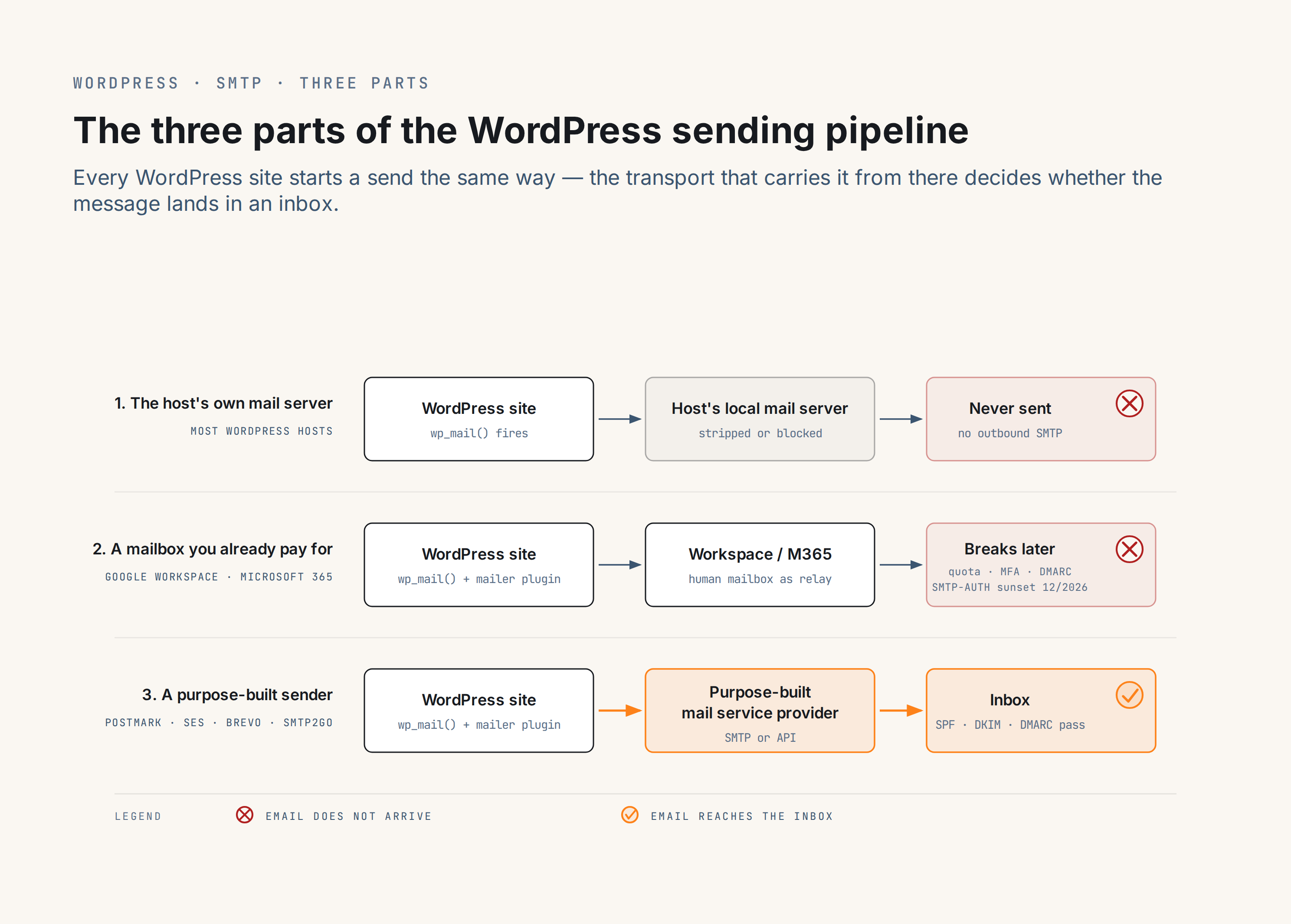
The three parts
1. The host’s own mail server
Every Linux server has a mail transfer agent (MTA) in principle, but in practice most WordPress hosts either strip it out, block outbound SMTP on new instances by default to prevent abuse, or leave a bundled relay running on a shared IP that carries no SPF, DKIM, or DMARC records for the sending domain. The result: password resets vanish, form submissions disappear, and the site administrator only finds out when a customer complains.
The exceptions are a small, named set. Kinsta provisions A transactional email is the automated message a WordPress site sends in response to a single user action – a password reset, an order confirmation, a form receipt – addressed to the user who triggered it. Read full reference → via MailChannels with authentication configured. Pressable and wordpress.com route outbound mail through Automattic’s own infrastructure. On everyone else, the host’s mail server isn’t the answer.
2. The client mailbox provider
Google Workspace, Microsoft 365, personal Outlook.com and Gmail: mailbox platforms. Every WordPress agency knows one intimately because clients already pay for one. The trap is that a mailbox looks like a working SMTP server. It accepts credentials, it authenticates, it delivers when tested with the operator’s own account. Plugging it into a mailer plugin feels correct.
It isn’t correct, and Google and Microsoft have spent a decade making sure it isn’t. The mailbox provider is not designed to be an application MTA. It has been progressively hardened against that use. Quotas, MFA, App Password invalidation on password changes, SMTP-AUTH deprecation timelines, and alignment breakage all follow from the same underlying decision: mailboxes are for humans reading mail, not applications sending it. A mailer plugin can technically make the connection. Every failure mode in that chain is a downstream consequence of the mailbox provider being asked to do a job it declined years ago.
3. A purpose-built transactional sender
Postmark, Amazon SES, Mailgun, SMTP2GO, Brevo, Resend, and the rest of the catalog exist because applications need to send mail and mailbox providers won’t. These are transactional providers: the entire product is application-generated mail delivered reliably. Free tiers on Brevo (300 messages/day) and SMTP2GO (1,000/month) cover a typical WordPress site outright; paid plans start around $15/month for 10,000 messages on providers like Postmark. Authentication is straightforward: the provider hands the operator three DNS records to publish, the operator publishes them, mail flows. The full catalog lives at the SMTP email services directory; the free-tier ceilings are compared at free SMTP servers for WordPress.
Why the client mailbox is the hardest
Google Workspace’s SMTP relay caps at 2,000 messages per 24 hours (500 on free Gmail) on a rolling window, per Google’s  Workspace sending limits; beyond the cap, the relay returns transient failures regardless of authentication. Microsoft is retiring Exchange Online SMTP AUTH: default-on for existing tenants is scheduled to be disabled at the end of December 2026, new tenants after that cutoff lose access entirely, and personal Outlook.com accounts created in 2026 already ship without it (Exchange Team’s
  updated deprecation timeline). Workspace mailboxes rewrite the From address in some configurations, breaking DMARC alignment for domains that depend on
 d=example.com. App Passwords get invalidated silently on the next account password change, MFA policies change without warning, and a working mail path breaks the morning after an admin tightens security defaults.
None of this is adversarial. Google and Microsoft aren’t wrong to harden mailbox providers against being application MTAs. Global abuse is what forced the hardening, and it isn’t going back the other way. The hardening is real, though, and it is the reason the path that felt most obvious keeps breaking.
The boring right answer
Default to part 3. For a WordPress site sending under 100,000 transactional messages a month, which describes almost every WordPress site, the free tier of a purpose-built transactional provider covers the volume and the paid tier scales without surprise. The specific numbers worth knowing:
- Brevo: 300 messages/day, permanent free tier. The shortest path to a working mail configuration.
- SMTP2GO: 1,000 messages/month with a 200/day cap, permanent free tier. Suits sites that send in bursts rather than at steady volume.
- Postmark: Basic plan $15/month for 10,000 messages; a 100/month sandbox tier covers evaluation but is not sized for production. The paid on-ramp when tight delivery-rate enforcement matters from day one: Postmark declines marketing traffic and monitors sender behaviour aggressively, which is the mechanism behind its inbox-placement track record.
The free SMTP servers roundup compares the free-tier ceilings across the field.
The mechanical follow-ups
Authentication. Whichever provider is chosen, the sending domain needs SPF, DKIM, and DMARC records published in DNS. The provider hands over the exact record values, the DNS host publishes them, and mail authenticates. The WordPress email setup ultimate guide covers the record syntax and the alignment rules; this piece leaves the DNS depth there rather than repeating it.
A mailer plugin. WordPress core routes all outbound mail through wp_mail(); a mailer plugin hooks that function and sends messages through the chosen provider by SMTP or API. Every major transactional provider is supported by every serious mailer plugin. The best WordPress SMTP plugins roundup covers the field, with per-plugin trade-offs.
If you insist on part 2
There are real cases where the mailbox path is defensible. A small-business owner’s site sending a handful of contact-form notifications to their own Workspace mailbox, under the daily cap, with the From address matching the mailbox owner. An agency’s internal-only site whose entire outbound mail is admin notifications. A single-tenant WooCommerce shop whose order confirmations go to the same Workspace user who owns the domain. In all of those, alignment is already handled because the sender genuinely is the mailbox user.
For the current connection details, the App Password vs OAuth choice, and the post-December-2026 migration path, see WordPress SMTP with Google Workspace and WordPress SMTP with Microsoft 365.
Where to go next
- WordPress email setup ultimate guide: when you’re ready for the full technical walkthrough, this is the depth piece — the delivery chain end to end, DNS record syntax with examples, per-provider setup steps, and the failure modes each one tends to hit.
- SMTP email services directory: this is where you’ll find every purpose-built sender we cover, ordered by fit for a typical WordPress site, with a short verdict on each.
- WordPress hosts and email: if you want to check whether part 1 is actually viable on your host before ruling it out, this is the reference — per-host notes on which ones run their own mail server well enough to trust, and which quietly punt to something else.