
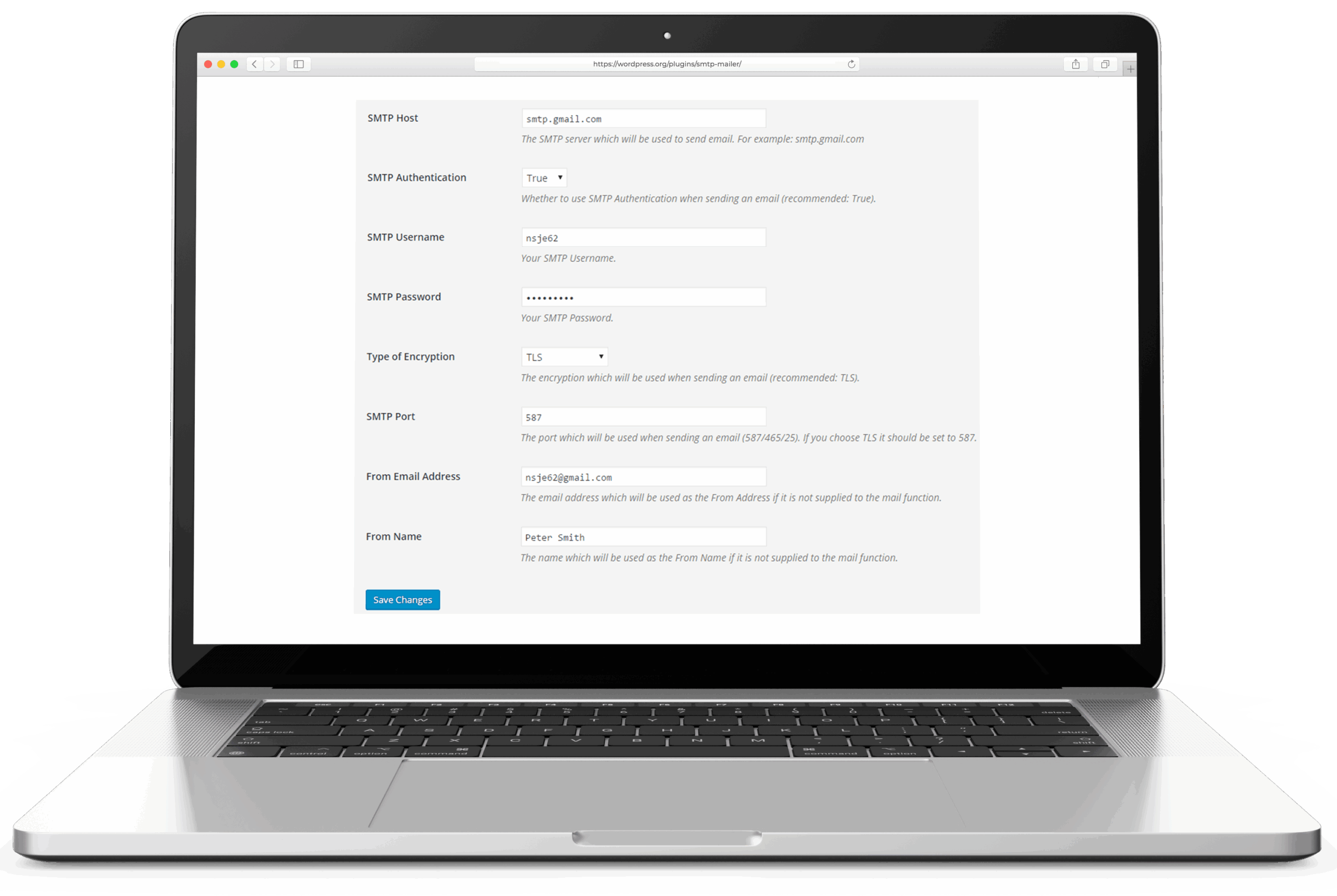
SMTP Mailer is a minimal generic SMTP relay for WordPress. It takes over wp_mail() and routes outgoing mail through a configured SMTP server; configuration is a single settings screen. No native provider API integrations, no OAuth, no logging in the free core. What sets it apart from the category leaders is a detail in the Test Email tab: after clicking Send, the plugin surfaces the full SMTP session transcript on screen. For operators debugging a delivery failure, that transcript is the answer.
Noor Alam (wp.org username naa986) published the plugin in December 2015 and has maintained it independently ever since, distributing it through his site at  wphowto.net. The wp.org listing reports 70,000+ active installs and a 4.5-star rating across 66 reviews. Version 1.1.26 shipped in May 2026 with a WordPress 7.0 compatibility update; the plugin is tested up to WordPress 7.0.
The short recommendation: SMTP Mailer is the right pick for an operator who has working SMTP credentials and wants the smallest possible plugin to relay WordPress mail through them. It is not the right pick for anyone who needs OAuth (for Gmail or Microsoft 365), native provider API integrations, email logging in the free tier, a fallback SMTP connection, or any form of failure alerting. Those requirements belong at WP Mail SMTP, FluentSMTP, or Post SMTP. The same author maintains Gmail SMTP as a separate plugin for the Gmail OAuth case.
What the free version includes
The free plugin is one screen. Settings cover:
- SMTP host: the address of the outgoing mail server.
- SMTP authentication: enable or disable credential-based auth.
- Username and password: credentials for the SMTP server.
- Encryption: TLS (port 587), SSL (port 465), or none (port 25).
- From email and From name: the sender identity used on outgoing messages.
- Force From overrides: the From name, From email address, or full From address can be forced across all outgoing messages, overriding whatever individual plugins supply.
- Disable SSL certificate verification: suppresses the PHP 5.6+ SSL warning on servers with a misconfigured certificate. Useful for debugging; not for production.
The SMTP session transcript
The Test Email tab sends a real message through the configured server. Once that send completes, the screen switches to display the full SMTP dialogue: the EHLO, the STARTTLS negotiation, the AUTH exchange, the MAIL FROM, the RCPT TO, the DATA, and every server response code along the way. That transcript is what most generic debugging conversations eventually ask you to produce manually. SMTP Mailer surfaces it automatically. The other major WordPress mailers (WP Mail SMTP, FluentSMTP, Post SMTP) report send success or failure with an error message; they do not capture the raw SMTP session. When an error message like “SMTP Error: data not accepted” is not enough, the transcript usually is. See How to read an SMTP session log for a walkthrough of what each line means.
What the free version does not include
- No OAuth. Gmail via Less Secure App (LSA) access was Google's name for the third-party authentication path that used a plain account password against Gmail's SMTP, IMAP, and POP endpoints. Google shut it down for consumer accounts on 30 May 2022 and for Workspace accounts on 1 May 2025; OAuth, App Passwords, or a different sending provider replace it. Read full reference → works; Gmail via OAuth does not. Microsoft 365 / Outlook, which many hosting environments push, requires OAuth and is not supported by SMTP Mailer’s free core. The author publishes Gmail SMTP for the Gmail OAuth case.
- No native provider API integrations. No AWS SES SDK, no Mailgun API, no SendGrid API. Everything goes through generic SMTP. This is by design for a minimal relay; it is a limitation if a provider offers better deliverability through its API than through its SMTP relay.
- No email logging. The free version does not record what was sent, when, to whom, or whether it arrived. The paid Email Logger add-on covers this.
- No fallback connection. A single SMTP server handles all outgoing mail; if it is unreachable, sends fail.
- No failure notifications. No push alerts, no Slack messages, no webhook pings.
- No background queue. Sends happen in the PHP request that triggers them.
- No DNS diagnostics. No SPF, DKIM, or DMARC checker built in.
Paid add-ons
Two add-ons extend the free core, sold as a bundle at $49.99 for unlimited sites on a perpetual licence (a one-time payment, not a subscription):
- Reply-To: adds a
Reply-Toheader to all outgoing messages. Useful for forms where replies should go to a different address than the sending SMTP account. - Email Logger: captures and displays all outgoing messages sent through SMTP Mailer, with recipient, subject, and delivery status. This is the logging layer the free core lacks.
The core plugin is free. The add-ons are paid. Unlike the tier-based subscriptions at WP Mail SMTP or Post SMTP, there is no annual renewal.
Assessment
SMTP Mailer covers one case cleanly: bring working SMTP credentials, add a minimal WordPress relay, move on. The credential screen, the force-From overrides, and the Test Email tab with its session transcript are the entire feature set. Nothing requires a subscription to function.
The session transcript is the one capability worth singling out. An operator staring at a generic “SMTP authentication failed” or “connection timed out” error in WordPress can spend an hour diagnosing the wrong thing. The transcript names where the exchange broke: whether STARTTLS succeeded, whether the AUTH step rejected the credentials, whether the server accepted MAIL FROM. That visibility is available in the free plugin and absent from the heavier mailers.
The gaps are real and not ignorable for many sites. No OAuth makes Gmail and Microsoft 365 connections more fragile than they need to be. No logging means there is no record when a WooCommerce order email or a contact-form send fails silently. Operators who hit either constraint have a straightforward path to Post SMTP or FluentSMTP, both of which cover those gaps in the free tier.
For most WordPress sites, FluentSMTP or WP Mail SMTP are the right defaults. SMTP Mailer is the right tool for the operator who already knows what SMTP server they are using and wants nothing else in the way.
For the broader setup the plugin slots into, see how to set up WordPress email.
Plugin data verified June 2026 against  wordpress.org/plugins/smtp-mailer and wphowto.net. Tested against version 1.1.26.