
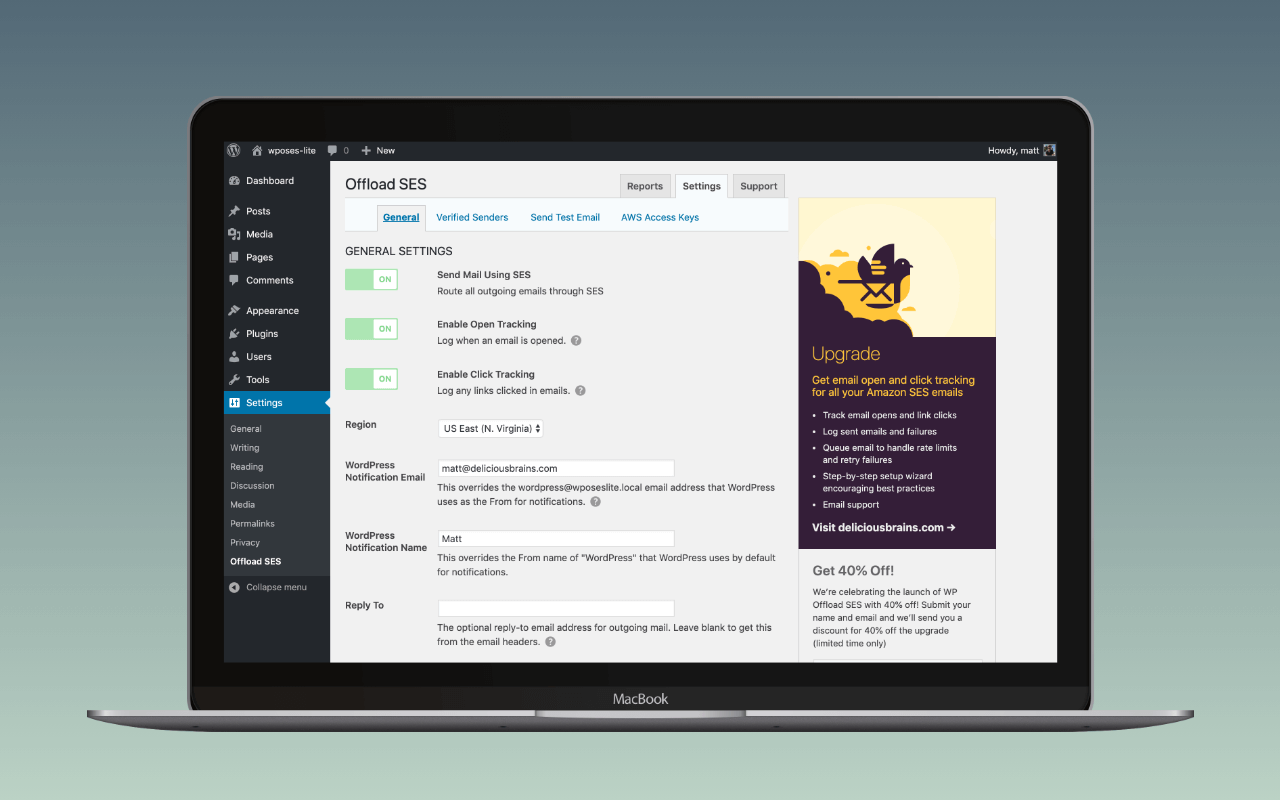
WP Offload SES is a WordPress mailer plugin that does exactly one thing: route wp_mail() through Amazon SES. It does not support any other sending service. That is the product. The architectural choice that follows from the focus is the one that matters: WP Offload SES talks to the SES API directly, with IAM credentials, rather than to the SES SMTP endpoint on port 587 with SMTP credentials the way a general mailer plugin would. The reward for the single-provider focus is the deepest Amazon SES surface area in the category: domain and sender verification from the WordPress admin, SES send-rate statistics on a dashboard, and a setup wizard that walks AWS account creation, IAM credentials, region selection, and identity verification as a sequence rather than as a generic SMTP form. A site that wants the option to swap to a different mailer later is using the wrong plugin.
The plugin is developed by WP Engine, which acquired the Delicious Brains plugin portfolio (WP Offload SES, WP Offload Media, WP Migrate, Advanced Custom Fields, Better Search Replace) in June 2022. The current Lite version on wordpress.org is 1.8.1, released July 2026, with 10,000 plus active installs and a 4.3 star average from 36 ratings. Development cadence under WP Engine is steady: a major release every nine to twelve months, with point releases for AWS SDK updates and PHP compatibility.
The short recommendation: WP Offload SES is the right pick for a WordPress site already committed to Amazon SES, particularly multisite networks and operators who want to handle sender verification inside the WordPress admin rather than the AWS console. FluentSMTP and WP Mail SMTP are the better picks for any site that wants the option to switch providers later, or that uses SES alongside another mailer.
What ships in Lite
The free Lite version on wordpress.org handles the core job and a meaningful amount of the SES-specific work:
- SES setup wizard. Steps through AWS account, IAM access keys, region selection, and identity verification, and reflects whether the SES account is still in the sandbox.
- Domain and sender verification from inside the WordPress admin. Add a sender address or domain in the plugin settings; the plugin posts the request to SES and renders the verification status without a trip to the AWS console. Once the three DKIM CNAMEs are live, the DNS auth checker reads how the SES-generated selectors and (for custom MAIL FROM)
include:amazonses.comresolve from the receiver’s perspective, adding a receiver-side view alongside the plugin’s in-admin verification status. The WP mail config generator takes IAM access key, secret, and region and returns a paste-ready block for the setup wizard’s credentials step. - Default sender configuration, including
From,Reply-To, andReturn-Path. These override the per-plugin defaults that WordPress core, WooCommerce, and form plugins ship with. - Email activity log. Every send is recorded with recipient, subject, status, and timestamp. The 1.7.0 release added the ability to delete success logs in bulk; failure logs stay.
- SES send-rate statistics, surfaced on a dashboard. SES enforces per-account send-rate limits (messages per second) that vary by account standing; the dashboard makes those limits visible without opening CloudWatch.
- Weekly health report delivered by email.
- Multisite support with network-wide configuration or per-subsite overrides.
- Direct integrations with Ninja Forms, Contact Form 7, Gravity Forms, and Email Subscribers and Newsletters.
There is no OAuth path; SES does not offer one.
What ships in Pro
The Pro version, branded simply WP Offload SES, adds the analytics and operations features:
| Pro feature | What it does |
|---|---|
| Open and click tracking | Adds SES open and click event collection with reporting in the WordPress admin |
| Auto-retry queue | Re-attempts failed sends, with rate-aware queuing that respects the SES send-rate limit |
| Manual retry and resend | Retries failed sends or resends any sent message from the log |
| Email search | Filter the log by date, recipient, and subject |
| Full email content viewing | Reads the stored body of any logged send |
| Per-email engagement analysis | Open and click counts surfaced per message |
| PriorityExpert support | Vendor-side developer support contract |
Tiers run from $99 a year for one site (Bronze) up to $699 a year for one hundred sites (Mjolnir), with intro discounts of roughly twenty percent on the first five tiers. Renewal is at the higher number. Gold ($199 a year, five sites) and above add priority support and explicit multisite assistance; Bronze and Silver get standard support only.
The single-provider trade-off
The honest weakness of WP Offload SES is the one the brand promise implies: it only talks to Amazon SES. A site that wants to A/B test SES against Postmark, or to fail over to SendGrid when SES has a regional incident, or to migrate off SES entirely without uninstalling its mailer plugin, is in the wrong shop.
FluentSMTP does Amazon SES at the free tier, alongside Gmail, Outlook, Mailgun, Postmark, SendGrid, Brevo, SparkPost, SMTP2GO, Elastic Email, and Zoho ZeptoMail, with multiple connections and per-sender routing. WP Mail SMTP gates SES behind its Pro plan but ships the broadest free mailer catalogue and the most-polished setup wizard in the category. Either is the right pick when SES is one option among several rather than a long-term commitment.
What neither replaces is the in-admin verification and send-rate surfacing. Both general mailer plugins treat SES as a connection: enter the access key, the secret, the region, send a test, done. Neither walks the SES sandbox and identity-verification workflow, and neither surfaces the SES send-rate against actual sends on a dashboard. For an operator running serious SES volume across multiple WordPress sites, that surface is the reason to install WP Offload SES rather than configure SES inside FluentSMTP.
Assessment
The decision between WP Offload SES and a general mailer plugin reduces to one question: is Amazon SES a long-term commitment, or one option among several? When SES is the chosen infrastructure and the work to swap it out would be a real project, the SES-specific tooling pays for itself in not having to click through the AWS console for sender verification and send-rate monitoring. When SES is interchangeable with Postmark or SendGrid in the operator’s mind, the lock-in is a cost the general mailer plugins do not impose.
WP Offload SES is nanoPost’s recommendation for the first case. Multisite SES tenants, agencies running SES across a client estate, and operators who want sender verification and send-rate visibility without context-switching to the AWS console are the natural audience.
For the second case, the general mailer plugins are the better pick. FluentSMTP is the right default for sites that want logging, fallback, and routing across multiple providers without paying. WP Mail SMTP is the right default for sites that want the easiest first-time SMTP configuration on WordPress and do not mind the upsell. Post SMTP is worth considering for the mobile push notifications on email failure, which neither WP Mail SMTP nor FluentSMTP matches.
For a WordPress site that has committed to SES and wants the deepest SES integration on WordPress, WP Offload SES is what installs.
For the broader setup the plugin slots into, see how to set up WordPress email.
Plugin data verified August 2026 against  wordpress.org/plugins/wp-ses and
  deliciousbrains.com/wp-offload-ses/pricing. Tested against version 1.8.1. Pro tier ladder still spans $99 Bronze (1 site) to $699 Mjolnir (100 sites), USD, 20% first-year discount on the first five tiers; Gold and above get priority support. WP Engine ownership unchanged.