
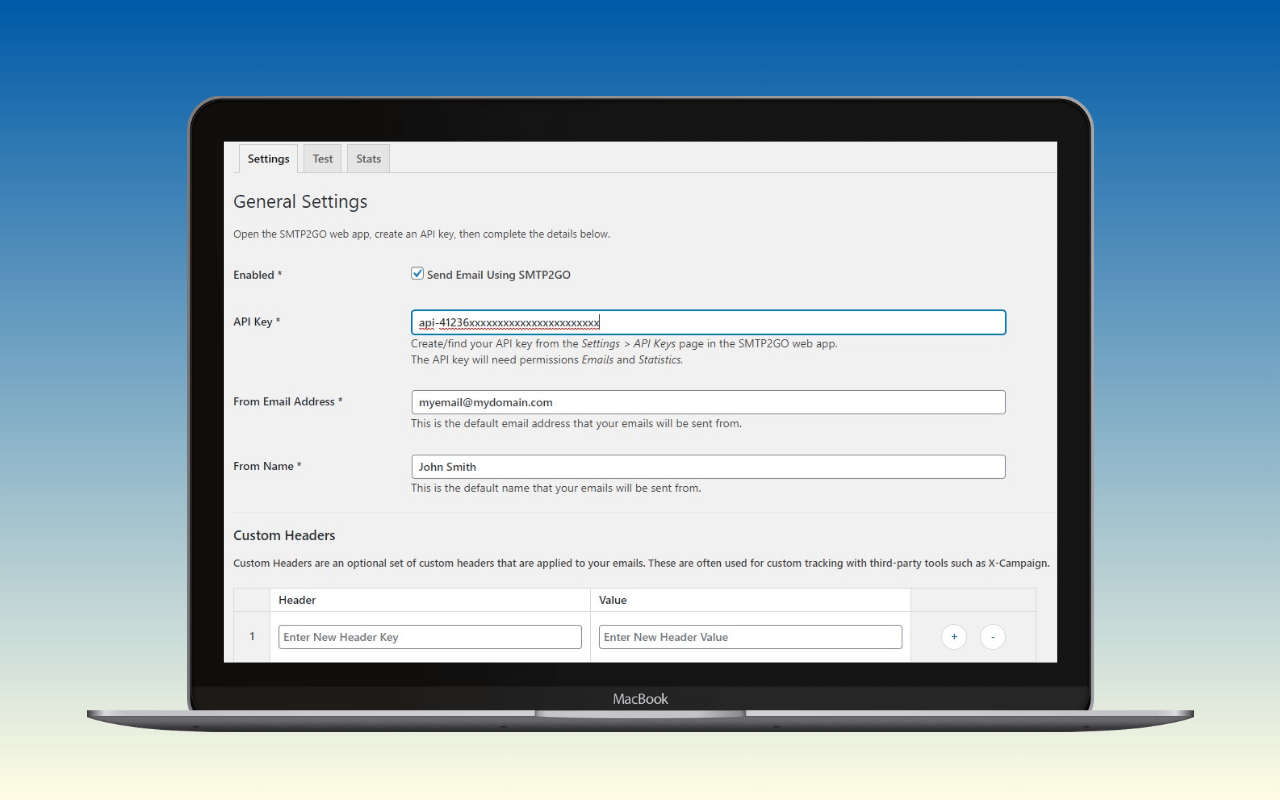
The SMTP2GO plugin is the vendor-published WordPress mailer for the SMTP2GO A transactional email is the automated message a WordPress site sends in response to a single user action – a password reset, an order confirmation, a form receipt – addressed to the user who triggered it. Read full reference → service. It replaces WordPress’s wp_mail() and routes every outgoing message through SMTP2GO’s HTTP API using an API key from the SMTP2GO dashboard. It supports one provider, exposes the provider’s settings rather than a generalised mailer configuration, and ships with no logging, no fallback, no multi-connection routing, and no OAuth. It is the shortest possible install path for a WordPress site that has already chosen SMTP2GO. For sites that have not chosen SMTP2GO, or that need plugin-layer logging or routing, a multi-provider mailer is the better fit.
The plugin is developed by SMTP2GO directly, with contributors Mark Collister and Kris listed on the wp.org plugin page. The current version is 1.17.0, with 30,000+ active installs at a 5-star rating across 65 reviews, tested up to WordPress 7.0, requiring WordPress 6.2+ and PHP 7.4+. The changelog shows steady maintenance: security and PHP-compatibility updates, an encrypted-at-rest API key store, and the region selector added in v1.16.0. There is no Pro tier. The plugin is free; the service it talks to is freemium.
The short recommendation: nanoPost recommends the official SMTP2GO plugin for WordPress sites that have decided on SMTP2GO and want the SMTP2GO Stats tab visible inside wp-admin without leaving the dashboard for the service’s web console. Pick a multi-provider mailer plugin such as WP Mail SMTP, FluentSMTP, or Post SMTP with SMTP2GO selected as the mailer when logging, fallback, per-sender routing, OAuth for Gmail or Microsoft 365, or future provider switching matters.
How it connects
Authentication is a single SMTP2GO API key generated in the SMTP2GO dashboard under Sending > API Keys. The plugin POSTs each message to SMTP2GO’s HTTP API rather than connecting over SMTP, which means there are no SMTP credentials to manage and no SMTP host or port configuration in the plugin. A site that wants SMTP-mode authentication against mail.smtp2go.com configures a generic mailer plugin instead.
Three connection details are worth knowing before installing:
- Region selector. SMTP2GO operates regional API endpoints in the US, EU, and AU. The plugin exposes the region as a settings field, the
smtp2go_api_regionfilter for runtime overrides, and theSMTP2GO_API_REGIONconstant forwp-config.phpconfiguration. The region selector arrived in v1.16.0; older installs use SMTP2GO’s global endpoint, which routes each request to the nearest of US, EU, or AU automatically. - Config-file storage. Setting
SMTP2GO_USE_CONSTANTStotrueinwp-config.phplets the plugin read the API key and region from constants instead of the database. Useful for multi-environment deployments where credentials live outside the database (and outside the database backups that flow between environments). - Encrypted-at-rest API keys. When constants are not in use, the API key is stored encrypted in the WordPress database (added in v1.10.0). The encryption is local to the site; it does not change the API key’s permissions in the SMTP2GO account.
SMTP2GO recommends Linux/Unix hosting and explicitly advises against Windows/IIS for this plugin.
The WP mail config generator takes an SMTP2GO API key and returns a paste-ready block for the plugin’s Settings tab, and the equivalent SMTP2GO_API_KEY / SMTP2GO_API_REGION constants when the SMTP2GO_USE_CONSTANTS config-file path is preferred. Once the sending domain is verified in the SMTP2GO dashboard, the DNS auth checker reads how include:spfa.smtp2go.com and the SMTP2GO DKIM CNAMEs resolve from the receiver’s perspective, so a stale nameserver or a mistyped selector shows up before real traffic does.
What ships in the plugin
The admin surface is three tabs:
- Settings. API key, region, from-name and from-email, and a forced-sender option that overrides per-plugin
From:headers. The use case is third-party plugins setting their own sender and breaking SPF or DKIM alignment. - Test. Send a one-off message from inside the admin to confirm the API key, region, and sender are wired up correctly. The test send round-trips through SMTP2GO and reports the API response in the admin: the fastest way to diagnose a misconfigured key.
- Stats. Pulls delivery, bounce, open, and click counts from SMTP2GO’s reporting API for the current billing period. This is the one feature that explains why the official plugin exists at all when a generic mailer can connect to SMTP2GO in the same five minutes: it is the only mailer plugin that puts provider-side delivery stats inside
wp-adminwithout a separate browser tab open on the SMTP2GO console.
The plugin also detects competing mailer plugins (added in v1.8.0) and warns when another mailer is active, because two plugins overriding wp_mail() at once is the most common cause of an SMTP2GO install appearing to do nothing. API request logging on the plugin side was added in v1.12.0; the log records the outbound API request and response code, which is useful when debugging a failing send against the SMTP2GO API directly.
What it deliberately does not do
Each of these is a reason a reader picks a multi-provider mailer plugin instead:
- No per-message email log table. The Stats tab is provider-side aggregate data, not a sent-mail log with subject, recipient, and a resend button. For that, FluentSMTP (free) or WP Mail SMTP (Pro) is the right plugin.
- No fallback connection. If the SMTP2GO API call fails, the send fails. There is no second mailer to retry through.
- No multi-connection routing. The plugin is one API key to one provider. Sites that need to route transactional mail through one path and marketing mail through another need a plugin with per-sender routing.
- No queueing. Sends are real-time, in-request. Sites that send mail in bursts large enough to require backgrounding face the same PHP timeout constraints as any non-queueing mailer plugin; the answer is provider-side processing, not the plugin.
- No OAuth. Not applicable to SMTP2GO, whose authentication model is API keys, but worth noting for operators arriving from a Gmail or Microsoft 365 setup.
- No SMTP mode. The plugin uses the HTTP API exclusively. A site that needs to connect to SMTP2GO over SMTP (for example, because outbound HTTPS to the SMTP2GO API is restricted at the network layer) uses a generic mailer plugin pointed at
mail.smtp2go.comwith the SMTP credentials from the SMTP2GO dashboard. The settings table is in the SMTP2GO sending-service review.
Assessment
The official SMTP2GO plugin earns its place on a WordPress site that has already chosen SMTP2GO and treats the Stats tab as worth more than the plugin-layer features it lacks. Most other mailer plugins reach SMTP2GO through the same HTTP API or through SMTP credentials, and most of them ship logging, fallback, and routing the official plugin does not. The trade is honest: install simplicity and in-admin delivery numbers, against the broader feature set of a general-purpose mailer.
For sites that want plugin-layer logging or fallback, FluentSMTP with SMTP2GO selected as the mailer is the cleaner pick. For agencies who already standardise on WP Mail SMTP for its setup wizard and multi-mailer catalogue, adding SMTP2GO inside that plugin is one configuration screen rather than a separate plugin install. For operators who want push notifications on mail failure to a phone, Post SMTP is the only option in the category that ships them.
The official plugin is not the wrong plugin. It is a narrow plugin, deliberately, and the narrowness is the point.
For the broader setup the plugin slots into, see how to set up WordPress email.
Plugin data verified August 2026 against  wordpress.org/plugins/smtp2go and SMTP2GO’s published changelog. Tested against version 1.17.0 (wp.org last-updated 2026-05-25).