
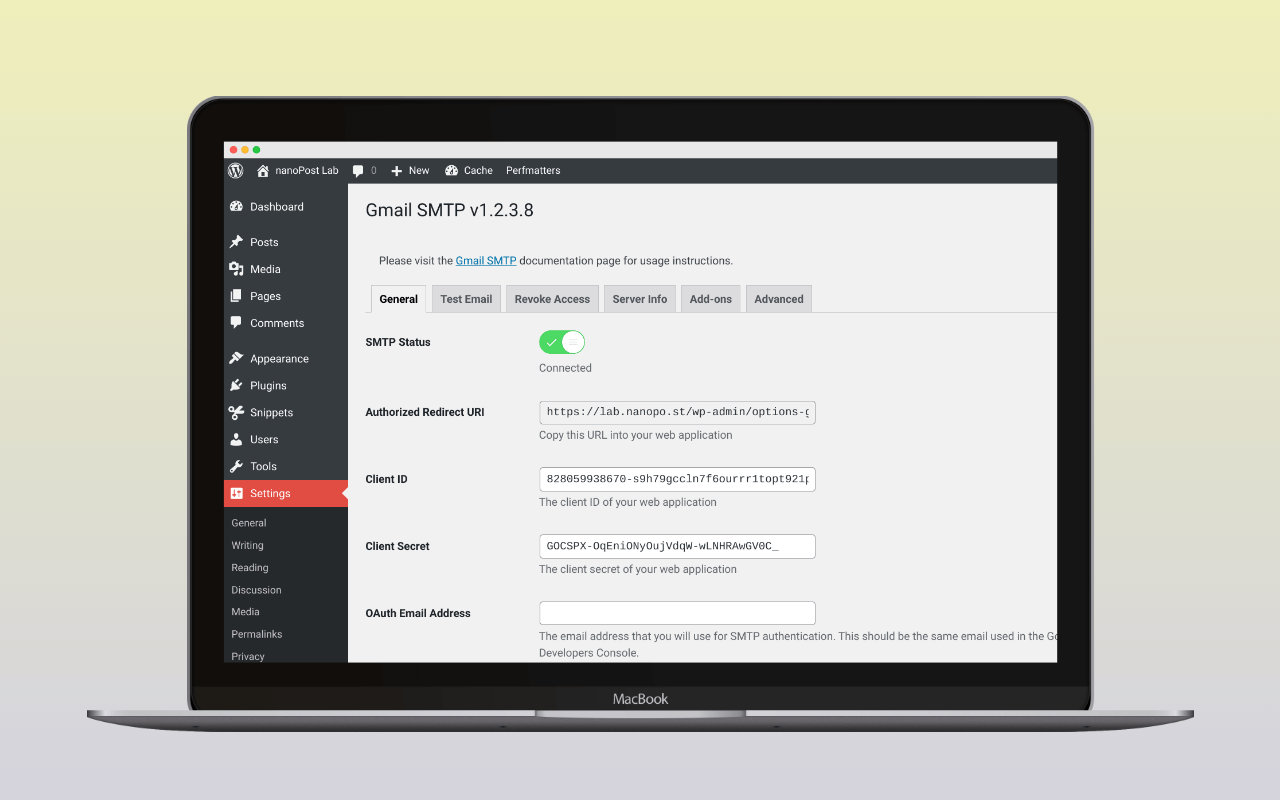
Gmail SMTP by Noor Alam (naa986) routes wp_mail() calls through smtp.gmail.com using XOAuth2 authentication — OAuth 2.0 credentials the operator configures once against their own Google Cloud project. There is no paid tier, no upsell, and no provider support beyond Gmail and Google Workspace.
WP Mail SMTP, FluentSMTP, and Post SMTP all include Gmail OAuth in their free tiers. Who still needs the single-provider plugin is the question this review answers.
What it does
The plugin replaces WordPress’s PHP mail() path with an authenticated SMTP connection to smtp.gmail.com. Authentication uses the XOAuth2 SASL mechanism: the plugin stores OAuth 2.0 credentials in WordPress options, exchanges a refresh token for a short-lived access token before each send, and presents that token to Gmail’s SMTP server in the AUTH XOAUTH2 command. The transport is SMTP over PHPMailer, not Gmail’s REST API. The plugin bundles the Google API PHP Client Library to handle the token exchange.
All outbound wp_mail() calls route through the sender’s Gmail or Google Workspace account. Gmail personal accounts are capped at 500 messages per day; Google Workspace at 2,000 per day. Neither limit is a constraint for a typical WordPress site sending contact-form and password-reset traffic. WooCommerce at real order volume needs a relay provider; this plugin is not the right answer there.
The OAuth scope problem
The plugin requests https://mail.google.com/, classified by Google as a restricted scope. It grants read, compose, send, and permanent deletion access to all email in the account. Google recommends this scope only when an application needs to permanently delete messages; for sending alone, the narrower https://www.googleapis.com/auth/gmail.send scope covers the need.
Restricted scopes carry two obligations that sensitive scopes do not:
- Apps published to Production must pass a Google security assessment — an auditing process intended for commercial applications with broad user bases. For a developer connecting their own Gmail account to a self-hosted WordPress site, this requirement is disproportionate.
- Apps left in Testing mode issue refresh tokens that expire after 7 days. A Cloud project with OAuth consent screen status “External / Testing” issues short-lived refresh tokens for any scope beyond the basic openid/email/profile subset.
https://mail.google.com/is not in that exempt subset.
The practical result for a site with the Cloud project left in the default Testing status: WordPress stops sending Gmail every week. The expiry is silent unless wp_mail_failed is hooked to a logger; the operator typically discovers it when a contact form goes quiet.
The plugin’s own setup guide acknowledges the verification problem and mentions joining a Google Group called “Risky Access Permissions By Unreviewed Apps” as a workaround. nanoPost has not confirmed this group is currently operational; it is an undocumented workaround, not an official Google path. Do not rely on it as a primary setup strategy.
The correct fix: publish to Production before authorizing.
The operator creates the Cloud project, configures the OAuth consent screen as “External,” and then sets the publishing status to “In production” — not because the app will be distributed, but because Production status removes the 7-day token expiry. A production app with an unverified consent screen still functions for the developer’s own account; Google shows an “unverified app” warning at authorization time that the site owner must click through once. After that, the refresh token persists.
The steps:
- Go to
 console.cloud.google.com and create a new project.
 - Enable the Gmail API under APIs & Services > Library.
- Under APIs & Services > OAuth consent screen: select “External,” fill in the required fields (app name, developer email), skip the Scopes and Test Users steps.
- Set the Publishing Status to “In production.” This is the step the plugin’s documentation underplays.
- Under APIs & Services > Credentials: create an OAuth 2.0 Client ID of type “Web application.” Set the Authorized Redirect URI to the value shown in the plugin’s settings page (
https://your-site.com/wp-admin/options-general.php?page=gmail-smtp-settings&action=oauth_grant). - Copy the Client ID and Client Secret into the plugin’s settings. Enter the Gmail address to authorize. Set encryption to TLS, port to 587.
- Click “Grant Permission.” Accept the unverified-app warning. The plugin stores the resulting tokens.
The full Google Cloud OAuth client setup — project creation, redirect URI, consent screen — is covered in detail in the Get OAuth credentials for Google guide.
With the app in Production, the 7-day expiry does not apply. Gmail’s SMTP server honors the refresh token until the user revokes access or the token is invalidated for other reasons: a password change on the Google account (which invalidates refresh tokens that hold Gmail scopes), exceeding 100 refresh tokens per account per OAuth 2.0 client ID, or a Google Workspace admin restricting the service.
Settings surface
The plugin settings screen, beyond the OAuth credentials:
- From Email and From Name control the
From:header. The safe default is to set From to the authorized Gmail address; using a different address may cause Gmail to show the authorized account address or append a “sent via smtp.gmail.com” annotation in the recipient’s email client, though the exact behavior depends on the receiving client and account configuration. - Reply-To, if the reply path should differ from the sender.
- Encryption (TLS recommended, SSL/465 deprecated) and SMTP port.
- SSL verification toggle, on by default. An SMTP connection failure citing certificate errors is a host-side problem; disabling verification here papers over it.
- Test email that fires a message through the current configuration and reports the SMTP response.
The plugin has no email log. Failed sends are not stored unless wp_mail_failed is hooked to a logging plugin. Sites that need a searchable log should add Check & Log Email, which sits on top of any mailer, or switch to a mailer plugin with built-in logging (FluentSMTP or Post SMTP).
The WP mail config generator takes the Google Cloud client ID and client secret and returns a paste-ready block for the plugin’s settings screen, so the client-ID and redirect-URI shuffle between Cloud Console and WordPress becomes a single copy step. On a Google Workspace custom-domain sender, the DNS auth checker reads how include:_spf.google.com and the google._domainkey selector resolve from the receiver’s perspective, so a domain that hasn’t published Workspace DKIM shows up before real traffic does.
Where it sits against the alternatives
In 2021 or 2022, Gmail SMTP by naa986 was a reasonable answer to “I need Gmail OAuth and the free tiers of the major SMTP plugins don’t include it.” That gap no longer exists:
- WP Mail SMTP: includes Gmail / Google Workspace OAuth in the free version.
- FluentSMTP: includes Gmail / Google Workspace OAuth in the free version. No paid tier.
- Post SMTP: includes Gmail OAuth in the free version.
- Easy WP SMTP: Gmail OAuth is Pro-only. naa986’s plugin retains a free-tier advantage here.
All of these plugins require the same Google Cloud Console OAuth client setup: credentials, redirect URI, consent screen, authorization. The plugin does not reduce that friction; it only reduces the plugin’s own settings surface.
On OAuth scopes: the https://mail.google.com/ restricted scope is not unique to naa986’s plugin. WP Mail SMTP uses the same scope (Gmail::MAIL_GOOGLE_COM in the Google API PHP Client Library, which resolves to https://mail.google.com/). FluentSMTP uses https://www.googleapis.com/auth/gmail.compose, also classified as restricted by Google. The 7-day Testing-mode token trap and the security-assessment requirement for Production apps apply equally to installations of WP Mail SMTP or FluentSMTP whose Cloud projects are left in Testing status.
Assessment
The plugin is the right pick for a site committed to a Gmail or Google Workspace sending address, with an objection to the broader feature surface of the multi-provider mailer plugins (more settings pages, Pro-tier upselling in WP Mail SMTP and Easy WP SMTP, more ongoing maintenance surface). The Google Cloud Console setup is the same work either way; this plugin wraps it in a minimal admin surface and nothing else.
The plugin is the wrong pick for:
- Sites that want email logging in the same package (none here; pair with Check & Log Email or switch to a mailer that includes it).
- Sites that may need to switch providers or add a backup connection.
- Sites already running WP Mail SMTP, FluentSMTP, or Post SMTP — all include Gmail OAuth for free, and adding a second mailer plugin to a working setup creates conflicts.
The 7-day token trap is the single most important operational note for any new install: set the Cloud project to Production before authorizing, or the site will stop sending Gmail every week until someone notices.
For the broader setup the plugin slots into, see how to set up WordPress email.
Plugin data verified September 2026 against  wordpress.org/plugins/gmail-smtp (version 1.2.3.22), the plugin SVN repository at plugins.svn.wordpress.org/gmail-smtp/trunk/, Google’s OAuth 2.0 API Scopes documentation, Google’s OAuth refresh token expiry policy, and Gmail sending limits documentation. Restricted
 https://mail.google.com/ scope re-confirmed in class.phpmaileroauthgoogle.php. WP Mail SMTP scope confirmed from github.com/awesomemotive/WP-Mail-SMTP src/Providers/Gmail/Auth.php and googleapis/google-api-php-client-services src/Gmail.php. FluentSMTP scope confirmed from plugins.svn.wordpress.org/fluent-smtp/trunk/app/Services/Mailer/Providers/Gmail/Handler.php.