
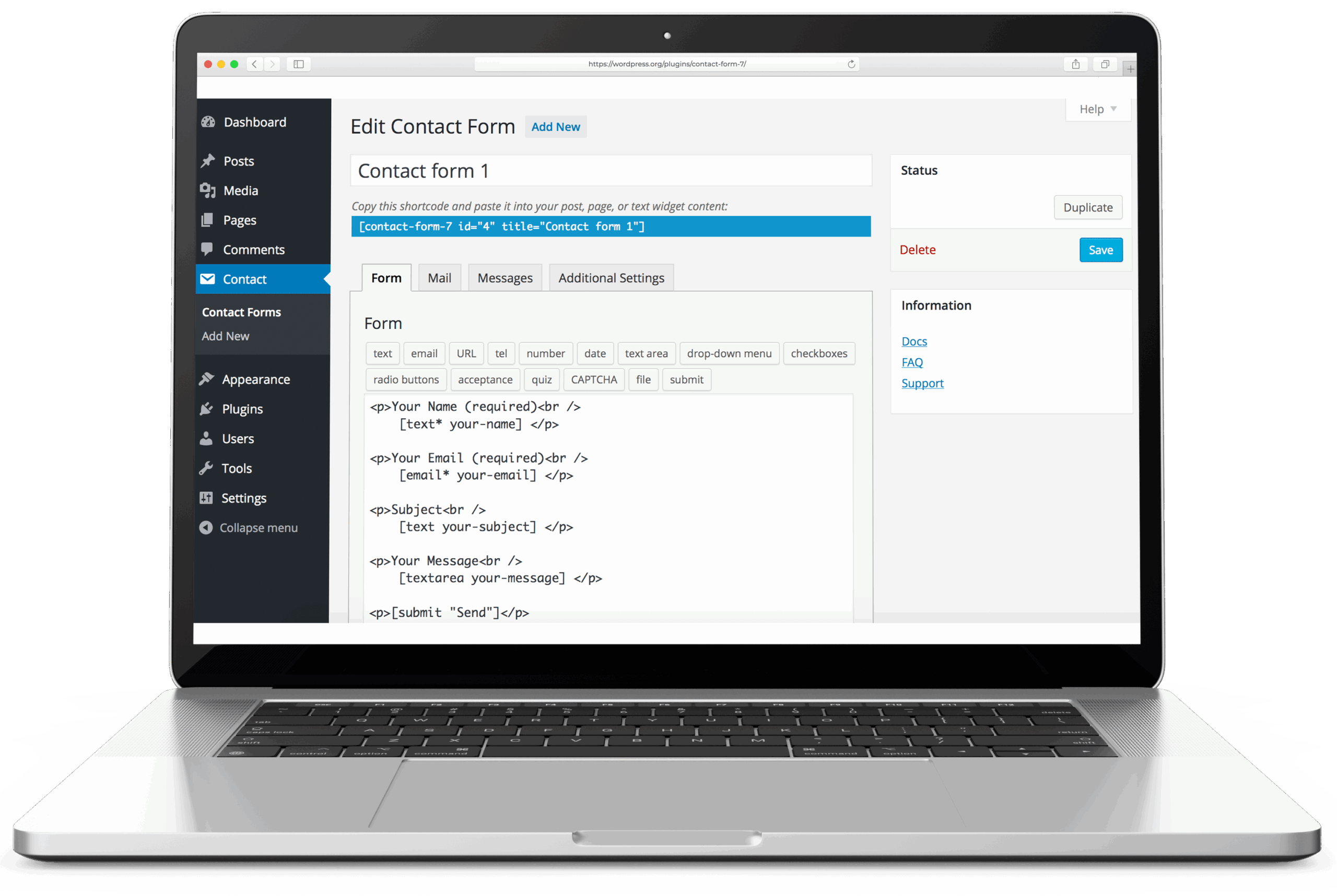
Contact Form 7 is the highest-install contact-form plugin in the WordPress repository, with 10 million active sites as of June 2026. Created by Takayuki Miyoshi of Rock Lobster Inc., the plugin has been maintained since its first release on August 2, 2007. It has no Pro tier and no commercial add-ons from the author. It is free software, not freemium.
Contact Form 7 creates forms, sends email, and otherwise stays out of the way. Submission storage, conditional logic, and multi-step forms are add-on territory by design.
The form builder
Forms are defined in a tag-based markup language: [text* your-name], [email* your-email], [textarea your-message], [submit "Send"]. The * marks a field as required. The interface is text-based rather than visual drag-and-drop; the developer has shown no interest in a visual editor and the tag interface is the product.
Each form has two companion templates: the form markup and the mail template that controls what gets sent to the site admin on submission. A second mail template (Mail 2) covers auto-replies to the submitter. Both use the same field tags as dynamic values.
The tag system is extensible. CF7 exposes a registration API for adding custom tag types, which allows developers to create field types not included in core. For the common contact form, no extension is needed.
The plugin supports file upload fields ([file your-file]), which pass attachments to the outgoing message via wp_mail(). Multiple forms per site are supported with independent configurations. 189 language/locale entries are listed on translate.wordpress.org (June 2026), ranging from fully translated to in-progress.
Forms are inserted via shortcode ( Error: Contact form not found.
Where it sits in the wp_mail pipeline
Contact Form 7 sends all outgoing mail through wp_mail(). That is the architecturally correct choice, and it is the fact that makes CF7 straightforward to deploy alongside a WordPress mailer plugin. WP Mail SMTP, FluentSMTP, Post SMTP, and any other mailer plugin that intercepts at the wp_mail level will automatically route CF7 submissions through the configured mailer. No per-plugin SMTP configuration is required: set up the mailer once, and CF7 inherits it.
The stack model is: form submission → CF7 calls wp_mail() → mailer plugin intercepts and routes via SMTP or provider API → message delivered.
For operators who need to modify the outgoing message at the form level before it reaches wp_mail(), CF7 exposes a wpcf7_mail_components filter that allows modification of headers, body, and recipient fields before the message sends. A common use case is altering the Reply-To header based on a field value from the submission. Common no-code needs are handled without touching the filter: cc: and bcc: on Additional Headers to send the same message to several inboxes, or pipe-separated dropdowns to route submissions to different recipients by category. Both approaches are covered in Send Contact Form 7 submissions to multiple email addresses.
Because CF7 uses wp_mail() rather than PHP’s mail() directly, it is visible to logging plugins. Check & Log Email and Post SMTP’s logging both capture CF7 submissions the same as any other WordPress mail. Sites running a mailer without built-in logging can add a logging plugin alongside CF7 without additional configuration.
What it does not do
Submission storage is not in the plugin. When a form submits, CF7 fires the email and discards the data. If the email fails, the submission is gone.
Flamingo is the standard answer: a companion storage plugin by Rock Lobster Inc. Flamingo stores submissions to the database independently of mail delivery; the storage succeeds even when the email does not. CF7’s Additional Settings tab includes a do_not_store directive that instructs Flamingo not to store a specific form’s submissions when needed, giving per-form control over what enters the log.
| Feature | Native | Add-on |
|---|---|---|
| Submission storage | No | Flamingo, CFDB7 |
| Conditional logic | No | Conditional Fields for CF7 |
| Multi-step forms | No | out of scope |
| Spam (reCAPTCHA v3) | Yes | — |
| Spam (honeypot) | No | Honeypot for Contact Form 7 |
Conditional logic is not in the plugin. Forms cannot show or hide fields based on user input without an add-on. Conditional Fields for Contact Form 7 adds a rules interface on top of the existing form editor and covers most show/hide requirements.
Multi-step forms, payment integration, and front-end registration are outside CF7’s scope entirely. These are different use-case tiers rather than gaps in a roadmap.
The add-on ecosystem is broad, but maintenance quality varies. Flamingo has Rock Lobster Inc. authorship; most others are independent. The last-updated date on any CF7 add-on’s wp.org listing is worth checking before installation.
Anti-spam
Three spam mechanisms are in core. Akismet integration: if Akismet is installed and configured, CF7 submits messages to Akismet for spam scoring and blocks those it marks as spam. An [acceptance] field requires the user to check a box before submission. And reCAPTCHA v3, which CF7 has supported natively since version 5.1 (December 2018), when v2 support was removed from core.
The reCAPTCHA v3 implementation is sitewide: a single key pair configured in CF7 settings applies to all forms. reCAPTCHA v3 is score-based: no visible widget, no challenge for the user. CF7 evaluates the score returned by Google’s API and rejects submissions that fall below the threshold, with the submitter seeing a validation error. Sites that need the v2 visible checkbox widget can use a community add-on.
Honeypot fields are not included in core. The Honeypot for Contact Form 7 plugin adds a hidden field that bots populate and humans do not.
Where it sits against the alternatives
WPForms (Awesome Motive, the same parent company as WP Mail SMTP): free Lite version covers basic contact forms; conditional logic, form entry storage, and multi-page forms require paid plans starting at $49.50/year introductory ($99/year on renewal for a single site). Right comparison for a site that wants visual drag-and-drop and an integrated entry inbox. Not a meaningful comparison for a site that only needs to route a submission through a mailer.
Fluent Forms: free tier includes conditional logic and submission storage, which covers the two most common reasons operators reach for CF7 add-ons. For a site choosing a form plugin from scratch that knows it will need conditionals or a built-in submission log, Fluent Forms removes the add-on dependency. CF7 wins on simplicity and the independent-maintainer factor; Fluent Forms wins on free-tier feature breadth.
Gravity Forms: paid-only from $59/year. Conditional logic, multi-page forms, payment processing, and a deep integration library. The right comparison for sites that have established a specific need in that feature set; not a sensible comparison for a contact form that submits to an admin inbox.
All three alternatives also route through wp_mail() and are compatible with the same mailer plugins. Stack compatibility is not a differentiator; feature set and cost are.
Verdict
Contact Form 7 is the right default for a site that already has a mailer configured and needs nothing beyond routing a submission through it. The plugin hands off to wp_mail() cleanly, maintains compatibility across major WordPress releases, and carries no upsell pressure in a category that leans hard on it. Flamingo should be treated as a companion install rather than an optional extra on any site where losing a contact message has real cost.
For sites with conditional-logic requirements or a preference for a single plugin that includes storage, Fluent Forms earns the evaluation before CF7 plus add-ons. Contact Form 7’s install numbers reflect historical network effects as much as technical superiority; the plugin earns its place when the stack is already configured, the form is simple, and complexity is minimal.
For the broader setup the plugin slots into, see how to set up WordPress email.