
A DMARC record with a rua= tag starts producing daily email attachments within hours. Each attachment is a gzipped XML file from a single mailbox provider (Google, Microsoft, Yahoo, Comcast, Mail.ru, and any other receiver that processed mail claiming to be from the domain in the past 24 hours). The XML is structured, well-defined ( RFC 7489 section 7.2), and not at all obvious.
This is the moment most WordPress operators give up on DMARC. The policy is set, the reports start arriving, the data is unreadable, and either the policy stays at p=none forever (passive, no enforcement) or the rua tag gets deleted (no visibility, no enforcement). Using the reports instead means three actions: identify which servers are sending mail as the domain, see what is passing and failing authentication, and tighten policy from p=none to p=quarantine to p=reject with confidence. This piece walks one report through nanoPost’s DMARC XML reader, a browser-only parser, and explains what to do with what shows up.
What one aggregate report tells you
A single aggregate report answers one question: in the period this report covers (typically 24 hours), what messages did this one mailbox provider see from this domain, and what did each fail or pass authentication?
The diagnostic value is the cross-reference between sources and outcomes. A WordPress site sending through Postmark for transactional mail, a contact-form plugin that bypasses wp_mail() and calls PHP’s mail() directly, a MailerLite list for marketing, and a backup MTA from cPanel hosting will appear as four distinct sets of IPs in the reports. The reports tell you which of those four are passing DMARC alignment and which are not, and the IP addresses tell you which sender each row represents.
What the reports do not tell you: which specific messages were involved (no subject lines, no recipients, no content), whether messages reached the inbox after passing authentication, or what happened on the receiving end after the DMARC verdict. They are policy-evaluation summaries by source IP and authentication result, aggregated over a time window. That scope is the source of both their usefulness (one daily summary per receiver) and their limits (no per-message detail).
For the SPF / DKIM / DMARC mechanics this piece builds on, see the DNS setup guide and the first-principles email reference. For the broader WordPress email setup that comes before publishing a DMARC record (choosing a service, configuring a mailer plugin), How to set up email on WordPress is the hub.
Reading a report in the browser
Reports arrive as email attachments to whatever address is published in the rua= tag of the DMARC record. The attachments are gzipped XML, occasionally zipped, with filenames in the form google.com!example.com!1719360000!1719446400.xml.gz (sender org, reported domain, period start unix, period end unix). Opening one in a text editor produces a few hundred lines of well-formed XML per receiver per day. On a domain that sends any meaningful volume, that adds up to dozens of attachments per day from a dozen receivers. Manual reading does not scale.
For the single-report read, nanoPost’s DMARC XML reader parses the file in the browser. Drop the .xml, .xml.gz, or .zip onto the drop zone (or paste the raw XML into the textarea); gzip and zip are unpacked in-page via the browser’s native DecompressionStream, and the XML is walked with DOMParser. The plugin registers no upload endpoint, so nothing crosses the network. That matters because a DMARC report contains the IPs and volumes of every sender on your domain, including internal marketing tools and any legitimate service you would rather not name to a third-party vendor.
Once parsed, the reader renders five panels:
- Report header: reporter, contact address, report ID, date range, the domain the policy applies to, and the published policy (
p=,sp=,pct=,adkim,aspf). - Volume by disposition: the
<policy_evaluated><disposition>verdict on each record, bucketed tonone/quarantine/rejectwith counts and share. - Sending sources: one row per source IP, with total messages, DKIM-aligned share, SPF-aligned share, and the disposition counts, ranked by volume.
- Alignment failures: the source IPs whose mail aligned on neither SPF nor DKIM. This is the investigation list.
- Narrative: a plain-English rollup that names recognised sending providers in the failing list (and links to the nanoPost review, which has the provider’s DKIM setup).
That covers one report. For a domain with real volume, running the reader by hand on every attachment does not scale either; the alternatives are a paid hosted parser or a self-hosted pipeline.
Paid hosted parsers ingest reports automatically (forward them to the parser’s intake address, or grant IMAP access to the rua mailbox) and present a dashboard.  DMARC Analyzer,
  Postmark DMARC Monitoring, and
  EasyDMARC are the three the WordPress audience meets most often. Postmark’s offering is free for basic ingestion and is the simplest path for a small site that already uses Postmark. The others are paid tiers with longer retention.
Self-hosted parsers put the work on a server you control.  parsedmarc is the most actively maintained open-source option: a Python tool that pulls reports from an IMAP mailbox, parses them, and writes to Elasticsearch, Splunk, JSON, or a Kafka topic. The setup is a Python virtualenv, an IMAP account, and a cron job; the trade-off is running and updating the pipeline (and the dashboard layer) yourself.
nanoPost’s default recommendation: the DMARC XML reader for one-off reads and post-incident spot checks, parsedmarc for sites that want a no-vendor-lock long-term pipeline, and Postmark DMARC Monitoring for sites already using Postmark or that want zero setup. None of the three is the wrong choice; the differences are in setup cost, ongoing maintenance, and the depth of the trend analytics.
The XML the reader is parsing
Every panel in the reader is a projection of the same well-defined XML tree, defined by RFC 7489 section 7.2. Knowing the shape of the tree is what makes the reader output legible when a field looks surprising or a value looks wrong.
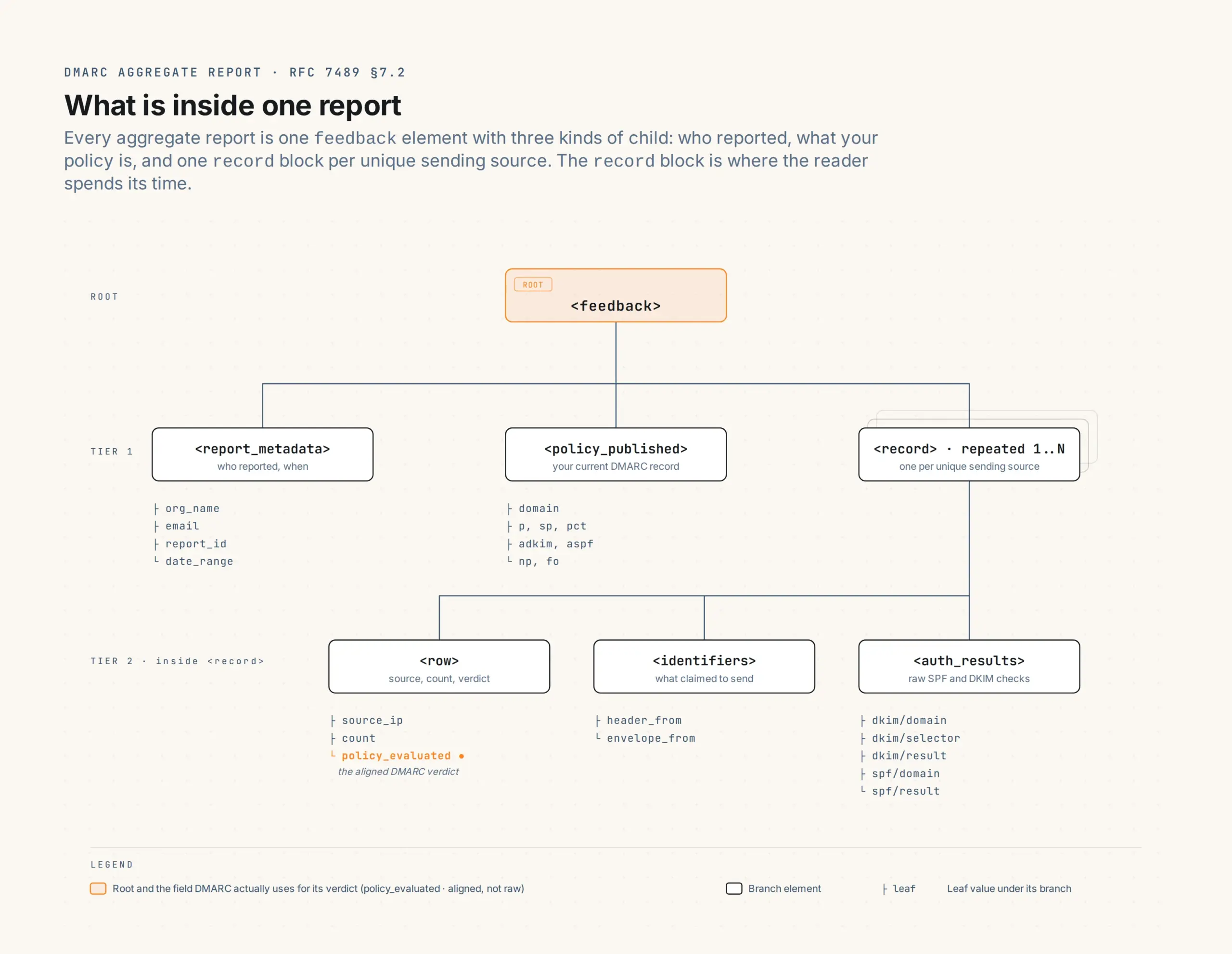
The sample below is constructed against that schema. The IPs are real published sender IPs from each vendor’s documented lists; the field shapes are exactly what a real Google-issued report contains; and the three records cover the three patterns that explain the rest of the field. example-wp.com stands in for a real WordPress site.
<?xml version="1.0" encoding="UTF-8" ?>
<feedback>
  <report_metadata>
    <org_name>google.com</org_name>
    <email>[email protected]</email>
    <report_id>16182841337028756143</report_id>
    <date_range>
      <begin>1718668800</begin>
      <end>1718755199</end>
    </date_range>
  </report_metadata>
  <policy_published>
    <domain>example-wp.com</domain>
    <adkim>r</adkim>
    <aspf>r</aspf>
    <p>quarantine</p>
    <sp>quarantine</sp>
    <pct>100</pct>
    <np>reject</np>
  </policy_published>
  <record>
    <row>
      <source_ip>50.31.156.6</source_ip>
      <count>147</count>
      <policy_evaluated>
        <disposition>none</disposition>
        <dkim>pass</dkim>
        <spf>pass</spf>
      </policy_evaluated>
    </row>
    <identifiers><header_from>example-wp.com</header_from></identifiers>
    <auth_results>
      <dkim><domain>example-wp.com</domain><result>pass</result><selector>20240101</selector></dkim>
      <spf><domain>example-wp.com</domain><result>pass</result></spf>
    </auth_results>
  </record>
  <record>
    <row>
      <source_ip>185.41.28.109</source_ip>
      <count>23</count>
      <policy_evaluated>
        <disposition>none</disposition>
        <dkim>pass</dkim>
        <spf>fail</spf>
      </policy_evaluated>
    </row>
    <identifiers><header_from>example-wp.com</header_from></identifiers>
    <auth_results>
      <dkim><domain>example-wp.com</domain><result>pass</result><selector>mail</selector></dkim>
      <spf><domain>relay.brevo.com</domain><result>pass</result></spf>
    </auth_results>
  </record>
  <record>
    <row>
      <source_ip>45.79.187.22</source_ip>
      <count>4</count>
      <policy_evaluated>
        <disposition>quarantine</disposition>
        <dkim>fail</dkim>
        <spf>fail</spf>
      </policy_evaluated>
    </row>
    <identifiers><header_from>example-wp.com</header_from></identifiers>
    <auth_results>
      <dkim><domain>example-wp.com</domain><result>fail</result></dkim>
      <spf><domain>otherhost.example</domain><result>fail</result></spf>
    </auth_results>
  </record>
</feedback>
Paste that into the reader and the five panels populate. Walking each record against what the reader shows:
First <record> (147 messages from 50.31.156.6, a Postmark sending IP): the header panel shows the domain and current policy (p=quarantine, pct=100, relaxed alignment); the volume panel shows 147 in the none bucket; the senders panel shows Postmark’s IP at the top with DKIM-aligned 147/147 and SPF-aligned 147/147; nothing appears in the alignment-failures panel for this IP. This is the easy case: everything aligned, no penalty, no action.
Second <record> (23 messages from 185.41.28.109, a Brevo egress IP): the senders panel shows Brevo’s IP with DKIM-aligned 23/23 and SPF-aligned 0/23, and the disposition remains none. This looks like a partial failure and is not one: DKIM signed for example-wp.com (aligned), and SPF passed against relay.brevo.com (Brevo’s own envelope-from), which does not align with the header-from. DMARC requires either SPF or DKIM to align. DKIM carries the alignment; the mail passes DMARC. The alignment-failures panel is silent for this IP. This is the normal shape for relays that use their own envelope domain.
Third <record> (4 messages from 45.79.187.22, an unrecognised IP): the senders panel shows the IP with 0/4 on both alignment counts and 4 messages under a quarantine disposition; the alignment-failures panel calls it out. This is what an impersonation attempt looks like: someone sent mail claiming to be from example-wp.com from an unrelated server, and DMARC enforcement caught it. Nothing to fix; the policy worked as designed.
Alignment vs raw: the field most operators miss
The single most common confusion is auth_results/spf showing pass while policy_evaluated/spf shows fail for the same record (as in the Brevo row above). This is not a contradiction. The SPF check itself passed: Brevo’s servers are authorised by the SPF record of relay.brevo.com, the envelope-from domain. But relay.brevo.com does not align with the header-from domain example-wp.com, so aligned SPF fails. DMARC’s verdict uses the aligned result, not the raw one.
The same distinction applies to DKIM. auth_results/dkim reports whether the signature verified against the key the sender published in DNS; policy_evaluated/dkim reports whether the signing domain aligns with the header-from. A relay can DKIM-sign with its own domain and pass the raw check while failing alignment. The reader collapses this into the aligned-share column in the senders panel, which is the field to trust for DMARC outcomes. The raw-vs-aligned split is only interesting when you are debugging why a source is misaligned: raw pass + aligned fail means the sender is authenticating with its own domain (fix: add a DKIM selector under yours, or configure custom return-path); raw fail means the signature or SPF lookup broke.
Common patterns in WordPress reports
After a few weeks of reports, recurring patterns emerge. The four most common:
Scenario 1: known relays pass, unknown IPs fail. Every known sender (SMTP relay, mailer plugin if it sends direct, any newsletter platform) appears with both DKIM and SPF aligned and disposition=none. Unknown IPs appear with both failing and quarantine or reject depending on the policy. This is the readiness signal: the policy is catching impersonation while not affecting legitimate mail. Tighten from p=none to p=quarantine, or from p=quarantine to p=reject, with confidence. Typical timeline for a small site: four to six weeks across the report cycle, ratcheting pct from 10 to 25 to 50 to 100 between policy steps if extra caution is warranted.
Scenario 2: a relay you forgot about is failing. Consistent failures from an IP that traces to a service the operator forgot was sending mail. Common cases: an old MailerLite or Mailchimp account still configured for the domain, a hosting provider’s transactional MTA (cPanel’s exim, for example) that the site has not been reconfigured to bypass, a contact-form plugin sending through wp_mail() with no SMTP plugin, or a CRM sending notifications. The fix is to add the service to SPF and configure DKIM signing if it is legitimate and ongoing, or to disable the sending. Raising the policy before the fix lands means losing that service’s mail. The SPF Record Merger helps when adding the include without blowing RFC 7208’s ten-lookup ceiling.
Scenario 3: high volume from random IPs, all failing. Hundreds or thousands of messages per day from a wide range of unrelated IPs, all failing both SPF and DKIM, all quarantined or rejected. This is a spam impersonation campaign: someone is sending mail claiming to be from your domain to large recipient lists. DMARC is working as designed: receivers catch it, the legitimate domain is not blacklisted. No action beyond confirming none of the failing IPs are your own. The campaign typically subsides on its own within a week or two when the spammer moves to a different target.
Scenario 4: an expected relay is failing alignment despite passing SPF. The trickiest one. A known sending service shows raw SPF passing but aligned SPF failing, and DKIM also failing. Diagnosis: the relay sends with its own envelope-from (killing SPF alignment) and signs DKIM for its own domain rather than yours (killing DKIM alignment). Fix: configure DKIM signing on the relay so it signs with a selector under your domain. Every major platform supports this and documents it. Until DKIM is fixed, the relay’s messages keep failing DMARC alignment regardless of how clean the raw SPF looks.
Tightening the policy
DMARC enforcement happens in stages, with the pct tag as the safety mechanism at each step.
Start at p=none. Reports flow, the operator reads them for two to four weeks, identifies the senders, and verifies that every legitimate sender is aligning (one of SPF or DKIM aligned, ideally both). Unknown failures should account for a small fraction of total volume and match the spam-impersonation pattern (random IPs, no recurrence).
Move to p=quarantine; pct=10. Now 10% of messages that fail alignment are quarantined; 90% still deliver (the pct test selects randomly). Watch reports for a week. The expected outcome: continued failures from spam IPs (now quarantined for 10% of attempts) and zero new failures from legitimate senders.
Ratchet: pct=25, then 50, then 100, with about a week between steps for a low-volume site. Faster ratcheting is fine for higher-volume sites where a week of data covers all sending patterns.
Hold at p=quarantine; pct=100 for two weeks, then move to p=reject; pct=100. At reject, failed messages are refused outright at the SMTP transaction. This is the strongest setting and the goal for a domain that wants spoofing prevention to be airtight.
A WordPress site sending through one well-configured relay typically reaches p=reject in four to six weeks. A site with three or four sending services and a more complicated mail flow takes longer, often two to three months, because each service needs its alignment verified independently. The pct ratchet keeps the roll-back cheap if a previously unnoticed sender starts failing after a tightening step.
What aggregate reports do not tell you
Aggregate reports cover policy evaluation, not message content. No subject line, no body, no recipient list, no header content beyond the From, the DKIM-signed identifier, and the SPF envelope-from. If a specific message is failing DMARC and you need per-message detail, aggregate reports cannot answer that.
Forensic (failure) reports via the ruf= tag are the per-message layer. They include a copy of the failing message and the authentication details. In practice: most major receivers (Google, Microsoft, Yahoo) no longer send forensic reports for privacy reasons, so a ruf= tag often produces little or no traffic. Smaller receivers and some corporate mail servers still send them. The aggregate-only fallback is to roll out enforcement gradually with pct ratcheting and investigate by sending test messages from each suspected source.
Aggregate reports do not tell you about forwarded mail either. A message that goes from your site to a recipient who forwards it on (a mailing list, a contact-form auto-reply forwarded to a team alias) will fail SPF at the second hop (the forwarder’s IP is not in your SPF record) and may fail DKIM if the forwarder modifies the body. Reports show the forwarder’s IP as an aligned-DKIM-pass / SPF-fail row, which looks alarming but is normal for forwarded traffic. ARC (Authenticated Received Chain, RFC 8617) preserves authentication through forwards; receiving servers that implement it can re-evaluate DMARC after a rewrite. ARC is implemented by sending services and forwarders, not by site operators.
Finally, reports do not tell you whether a message reached the inbox. A DMARC-pass message can still be filtered to spam based on content, sender reputation, or receiver-specific policy. DMARC alignment is necessary but not sufficient for placement. The SMTP session log reference covers the relay-side delivery confirmation; for inbox placement specifically, a seedlist test (sending to a known set of mailboxes and checking each) is the only direct measurement.
When the reader turns up a new legitimate sender you need to authorise, the DNS auth checker confirms what receivers currently resolve for your SPF, DKIM, and DMARC after the change lands. For the protocol overview, the first-principles email reference; for the records themselves, DNS setup for WordPress email.