
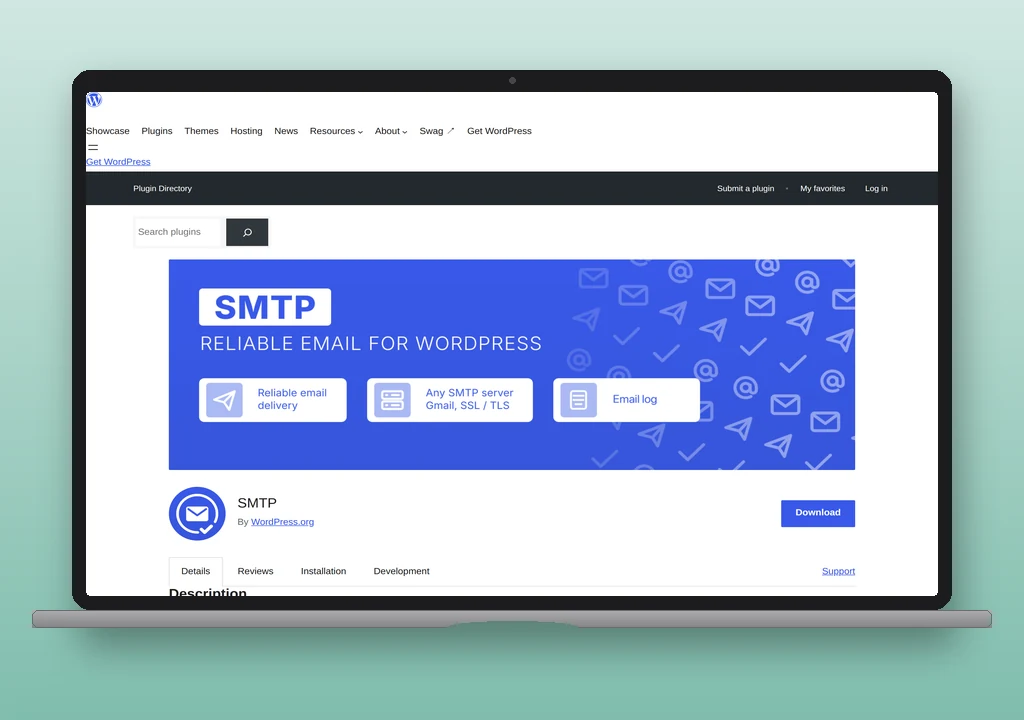
SMTP is a free WordPress plugin that sends the site’s email through one SMTP server you choose (the outgoing mail server a sending service gives you a host name, port and login for), and keeps a short log of the messages sent through WordPress’s standard mail function. It is  published by the WordPress.org Plugins Team, but it is not part of WordPress core, and no WordPress.org statement we found calls it a feature plugin or an official recommendation. Version 1.2.0
 came out on 16 November 2026 and is so far the only release. There is no paid tier, no add-on and no link to any sending service.
The short recommendation: install SMTP if you already have SMTP credentials from a relay such as Postmark and want a free plugin that sends through them, logs messages sent through WordPress’s mail function, wp_mail(), without storing their bodies or attachments, and, once Slack alerts are configured, can post one when a send fails. Compared with SMTP Mailer, the other one-relay plugin we review, it adds a built-in log and, when configured, Slack failure alerts. It is not the plugin for a site that signs in to Gmail or Microsoft 365 with OAuth, needs a backup connection when the first one fails, or wants to send through a provider’s HTTP API: 1.2.0 does none of those. FluentSMTP covers all three in its free version.
The findings come from testing 1.2.0 on 22 November 2026, and from its code where testing could not reach.
Setting it up
Settings live under Tools > SMTP. On a clean install the screen asks for the relay’s details:
- Provider: one option in 1.2.0, “Generic SMTP”.
- Host, Port (default 587) and Encryption: None, SSL, or “TLS (STARTTLS)”, the default.
- Authentication, on by default, with Username and Password.
- From email, From name and Force from, which overrides the sender that other plugins set.
Until a host is saved, the plugin changes nothing: WordPress keeps sending the way it did before.
Once the relay works, the DNS auth checker reads the SPF (Sender Policy Framework) is a DNS TXT record that lists the servers allowed to send mail using your domain. Receivers compare the sending IP to that list and use the result as one input to their accept/reject decision. Read full reference → and DMARC (Domain-based Message Authentication, Reporting, and Conformance) is a DNS TXT record that tells receivers what to do with mail from your domain that fails SPF or DKIM, and where to send reports about those failures. Read full reference → records on the From domain, and its DKIM (DomainKeys Identified Mail) is a cryptographic signature attached to each outgoing message, verifiable against a public key published in DNS. It lets receivers confirm the message was not altered in transit and originated from a server the domain authorised to sign on its behalf. Read full reference → key too if you type the relay’s DKIM selector into the checker’s optional selector field, which a per-domain selector such as Postmark’s needs.
Keeping credentials out of the database
Six constants in wp-config.php override the saved settings: SMTP_HOST, SMTP_PORT, SMTP_ENCRYPTION, SMTP_USER, SMTP_PASSWORD and SMTP_FROM_EMAIL. With all six set, the settings screen greys out those fields and labels each “Defined by the SMTP_… constant.” Provider, Authentication, From name and Force from stay editable, since no constant covers them.
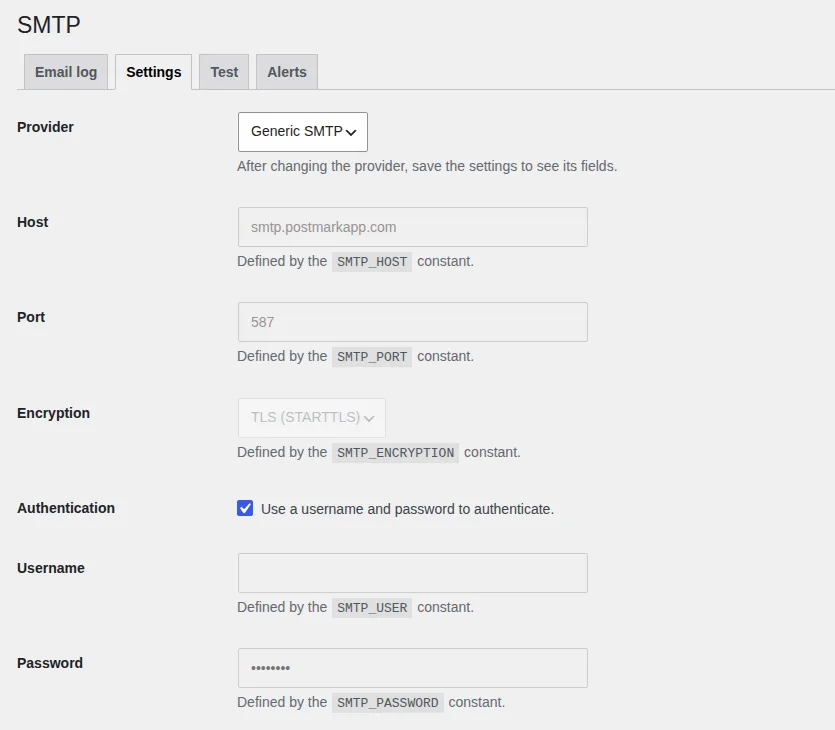
The constants matter more than usual here, because without them the password sits in the database in plain text. SMTP 1.2.0 stores it in its own smtp_credentials option, not autoloaded, with no encryption; in our lab the token string was present verbatim in that option. The code comments say all secret access goes through one class “so the storage can be replaced (for example by the core credentials API)”, which reads as a plan, not a feature. On a site where other people can read the database or its backups, put the password in wp-config.php.
The settings screen never prints the saved password back. It does print the username, and so does wp smtp status. When Postmark is set up with API Token authentication, as in our lab, the Server API Token is both the username and the password, so the token is visible in SMTP’s username field to anyone with access to Tools > SMTP. Postmark’s separate SMTP Access Key and Secret Key avoid that.
How it behaved in testing
We installed SMTP 1.2.0 from the wordpress.org zip on fresh WordPress 7.1.5 sites (PHP 8.3.6) and sent through Postmark’s SMTP relay, smtp.postmarkapp.com on port 587 with STARTTLS.
A working send. The Test tab’s email went out and arrived three seconds later. The receiving server recorded two passing DKIM signatures (Postmark’s own and one for the From domain) and a passing DMARC result. Both signatures are Postmark’s work, not the plugin’s; the plugin’s part was handing over a message Postmark could sign. Under the result, the Test tab prints the SMTP connection log: the server greeting, STARTTLS, the login, MAIL FROM, RCPT TO and the queue ID. The login line reads [credentials hidden]; the plugin redacts it before it reaches the screen. If you have not read one of these logs before, how to read an SMTP session log walks through each line.
What “Sent” means. Our first test went to an address outside the From domain while the Postmark account was still pending approval. Postmark accepted the message (250 2.0.0 Ok: queued), then bounced it four seconds later under its pending-account rule. SMTP showed “Test email sent” and logged the message as Sent. That is correct as far as SMTP goes: the plugin reports whether the relay accepted the message, and Postmark had. The bounce showed up in Postmark’s activity log, not in SMTP’s result or its log. To see what happened after the relay accepted a message, check the relay’s own log.
A failed send. With a wrong password, the Test tab returned SMTP Error: Could not authenticate with a second line of advice:

In the 1.2.0 code, that hint comes from a list of ten patterns the plugin looks for in the connection log, checked in this order:
| What the connection log shows | The plugin’s hint |
|---|---|
A command failed with 538, or a reply mentioning STARTTLS or “Encryption required” |
The server only accepts a login over an encrypted connection. Set Encryption to TLS for port 587, or to SSL for port 465. |
A command failed with 530 |
The server requires a login. Turn on Authentication and enter your username and password. |
A command failed with 534 or 535 |
The server rejected the login. Check the username and password. Many providers need a separate SMTP login and SMTP key or app password, and an API key or your account password will not work. |
| “Failed to connect to server” with a name-lookup error | The host name could not be found. Check the Host setting for typos. |
| Any other “Failed to connect to server” | The server could not be reached. Check the host and port. Port 465 needs SSL and port 587 needs TLS. If they are correct, your hosting company may be blocking the port, so try 587 or ask them. |
| STARTTLS failed, or the TLS handshake never completed | The encrypted connection could not be set up. Check that the Encryption setting matches the port, and that the host name matches the certificate of the server. |
MAIL FROM failed |
The server rejected the sender. Set the From email to an address your provider has verified, and turn on Force from if another plugin changes it. |
RCPT TO failed |
The server rejected the recipient. Check the address. Your provider may also only allow certain recipients, for example on a trial account. |
DATA failed |
The server rejected the message. Check the logs and sending limits of your provider. |
A send through PHP mail() logged as Result: false |
This server cannot send email with the default WordPress mailer. Configure an SMTP server in the Settings tab. |
The failure also went into the log as Failed with the error text, and the dashboard showed a notice: “SMTP: 1 email failed to send in the last 24 hours.”
Authentication on, no credentials. On a fresh site we entered the Postmark host, left Authentication ticked and saved without a username or password. The screen said “Settings saved.” and nothing else. The Test tab then explained the situation:

The test went out through PHP mail() from wordpress@ the site’s domain, and the log recorded the provider as “WordPress default”. The rule is in the plugin’s settings code: Generic SMTP requires a host, and requires the username and password whenever Authentication is on. Until all three are there, the plugin leaves WordPress’s mailer alone instead of sending through a half-configured relay and failing. The cost is that nothing on the settings screen says so. A site owner who forgets the password sees only “Settings saved.”, and the site keeps sending from wordpress@ through its default mail path even though the owner meant to use SMTP. Check the Test tab after every settings change.
A related catch: once a password is saved, the screen offers no way to clear it. An empty password field means “keep the saved one”.
Slack alerts. Alerts are off by default: the Alerts tab’s channel starts at None, and a failed send with that setting made no outbound call in our test. Choose Slack and save an incoming webhook, and the plugin posts a message when an email fails. We had no Slack workspace for the test, so we answered the webhook call inside the lab and recorded what the plugin sent: one POST naming the site, the error, the recipient, the subject and a link to the failed emails in the log. Delivery into a real Slack channel was not tested. The Alerts tab says it sends at most one alert every 15 minutes and counts the failures in between into the next one; in the code, the smtp_alert_throttle filter changes the interval. Apart from that webhook, the 1.2.0 code makes no outbound HTTP request: no licence check and no usage reporting.
The email log
The Email log tab lists emails sent through wp_mail(), with their date, recipient, subject, status (Sent or Failed), error and provider. The header says what it leaves out: “Only metadata is logged: the message body and attachments are never stored.” The 1.2.0 code agrees: it writes those fields and nothing else. In the code, a daily scheduled job deletes entries older than 30 days, and the smtp_log_retention_days filter changes the number.
That is enough to answer “did the order confirmation go out, and if not, what did the server say?”. It is not enough to see what a message said or to send it again. The same limit protects a site that sends password-reset links, order details or form submissions: no message body or attachment ever lands in the log. Recipients, subjects and error text do, and those can still be sensitive.
The code also checks whether another plugin has replaced WordPress’s mail function (FluentSMTP does this) or intercepted it through the pre_wp_mail filter. When one has, the log records the send under “other” rather than claiming it, and the admin screens say SMTP’s settings are not in use. We read this from the code; no second mailer was active in our lab.
WP-CLI
wp smtp has three commands: status shows each setting and whether it comes from a constant or the database, test sends a test email and exits with a non-zero code when it fails, and settings set changes settings. The password cannot be passed as an argument, because it would land in the shell history; you pipe it in instead:
printf '%s' "$SMTP_PASSWORD" | wp smtp settings set password=-wp smtp test --connection-log prints the same redacted SMTP log as the Test tab, which makes the plugin easy to check from a deploy script.
Updating from the old SMTP plugin
SMTP 1.2.0 took over the name and directory listing of an older plugin called SMTP, first listed in June 2011, originally created by Serghei Iakovlev, later maintained by Sorin Iclanzan, and last changed in June 2012. Because 1.2.0 sits under the same name, it arrives as an update to the old plugin. On the test site described below, where we had to force 1.1.2 active, wp plugin update smtp moved it to 1.2.0 and left it active. We did not test the update offer in the WordPress admin, or automatic updates.
The old plugin was already broken on current PHP. It encrypts the saved password with PHP’s mcrypt extension, which PHP removed in version 7.2. On PHP 8.3, 1.1.2 refused to activate with “Please enable ‘php_mycrypt’ in PHP” (the misspelling is the plugin’s), and once forced active, saving a password crashed the site with “There has been a critical error on this website.”
The 1.2.0 changelog says the previous plugin’s settings “are imported automatically”. The code shows the limit: 1.2.0 can decrypt the old password only if mcrypt is still loaded, which on PHP 7.2 and later it is not. No release of the old plugin is left to install, so we could not test the update exactly as a real site would meet it. We forced 1.1.2 active on a test site, saved its settings without a password, and updated in place. Host, port, encryption and username came across. The password did not. From email and From name were set from the site’s first user, with Force from ticked, because the old plugin always sent as that user. A warning on the first screen load said the password could not be imported and that mail would go through the default WordPress mailer until it was entered.
For a site that ran the old plugin: after the update, open Tools > SMTP, enter the password, and check the From address the import chose.
What 1.2.0 does not include
- No OAuth. Gmail works through an Less Secure App (LSA) access was Google's name for the third-party authentication path that used a plain account password against Gmail's SMTP, IMAP, and POP endpoints. Google shut it down for consumer accounts on 30 May 2022 and for Workspace accounts on 1 May 2025; OAuth, App Passwords, or a different sending provider replace it. Read full reference → where the account allows one. For Microsoft 365, Microsoft
 plans to turn off Exchange Online SMTP AUTH with basic authentication by default for existing tenants at the end of December 2026, though administrators can turn it back on; the Microsoft 365 migration guide covers the ways out.
- No provider APIs. Everything goes through SMTP. In the 1.2.0 zip the only built-in provider is Generic SMTP. The provider interface configures PHPMailer; it has no callback for sending through an HTTP API, and we found no documented way for another plugin to add one to this release. As of 22 November 2026, the
 GitHub repository’s main branch has merged support for API providers and for several connections; no release carries either yet.
- One connection, no fallback. If the relay is down, the send fails. When Slack alerts are configured, SMTP sends an alert, subject to its 15-minute throttle.
- No queue. Mail goes out during the page request that sends it. In the 1.2.0 code the plugin caps each wait on the relay at 15 seconds, where PHPMailer’s default is 300. We did not time it, but that cap should mean an unreachable relay slows a page rather than hanging it until the server gives up.
- No message bodies in the log, and no resend.
Verdict
SMTP 1.2.0 sends WordPress mail through one SMTP relay, says plainly on the Test tab when it is not doing so, and records whether the relay accepted each send or it failed. The failure hints point at the real cause, the plugin will not send through a half-configured relay, the connection log hides the credentials, and the WP-CLI commands keep the password out of the shell history. Nothing in it asks for an upgrade or promotes another product.
Against FluentSMTP, which is also free, SMTP has fewer features: no OAuth, no fallback, no full-message log, Slack as the only alert channel. In return, its log never holds a message body. Against SMTP Mailer, the same one-relay idea, SMTP adds a built-in log and Slack alerts: SMTP Mailer 1.1.28 has no failure alerts (we found none in its code), and its plugin page lists the email log as a separate Email Logger add-on. Two weaknesses are its own: the password sits in the database in plain text unless you use the constants, and the settings screen will save an authenticated setup with no password and say nothing about it.
Version 1.2.0 is its first and only release, out on 16 November 2026, six days before this review. A site that cannot afford to be early loses nothing by waiting for the next version.
nanoPost recommends SMTP for a site that already sends through a relay with an SMTP login and wants a free mailer that sends through it, logs messages sent through wp_mail() and can raise an alert when Slack is configured, with no vendor attached. For OAuth, a fallback connection or an HTTP API, choose FluentSMTP. For the wider setup the plugin fits into, see how to set up WordPress email.
Tested 22 November 2026: SMTP 1.2.0 (wordpress.org zip) on WordPress 7.1.5, PHP 8.3.6, SQLite, PHPMailer 7.1.1, relayed through Postmark SMTP on port 587 with STARTTLS. Five test sends. Slack alert payload captured in the lab, not delivered to Slack. Settings import tested with version 1.1.2 forced active on PHP 8.3, since no older release installs there; a site updating from a working older-PHP install was not tested. No second mailer plugin was active, so the detection of another mailer is read from the code, not tested. Code read from the 1.2.0 release and the GitHub repository on the same day.