
Question
Our brand has the same name as a company in Asia, and we get lots of messages relating to this via Contact Form 7 which messes up our marketing analytics. About 75% of mail is from these customers so I’d love to find a way to prevent this.
We only service the UK, so I’m wondering if there is a way to modify CF7 to block certain countries from using the form? Or if there is a better way of doing it?
[Reddit] Potential ways to limit unwanted CF7 mail caused by brand name confusion?
Our answer
Country-blocking works, and four approaches are listed below. Before reaching for it: the problem here is brand confusion, not geographic abuse. A full country block prevents legitimate enquiries from that country too, and the asker explicitly asked whether there is a better way. There usually is, and the non-blocking alternatives at the bottom address the actual problem rather than the submitters’ location.
When country blocking is the wrong tool
Country blocking makes sense when the problem is:
- Compliance-driven: a product genuinely cannot be sold or serviced in a jurisdiction.
- Abuse-driven: spam, credential stuffing, or high-volume bot traffic from specific countries.
It is a poor fit when the problem is brand confusion volume. The people submitting via CF7 are not abusers: they are customers of a different company who found the wrong form. Blocking their country bars genuine customers from that region while doing nothing about the underlying misdirection.
Skip to the alternatives section if the blocking options feel disproportionate to the actual problem.
Blocking options (ordered by cost to revert)
1. Cloudflare WAF rule on country + URI
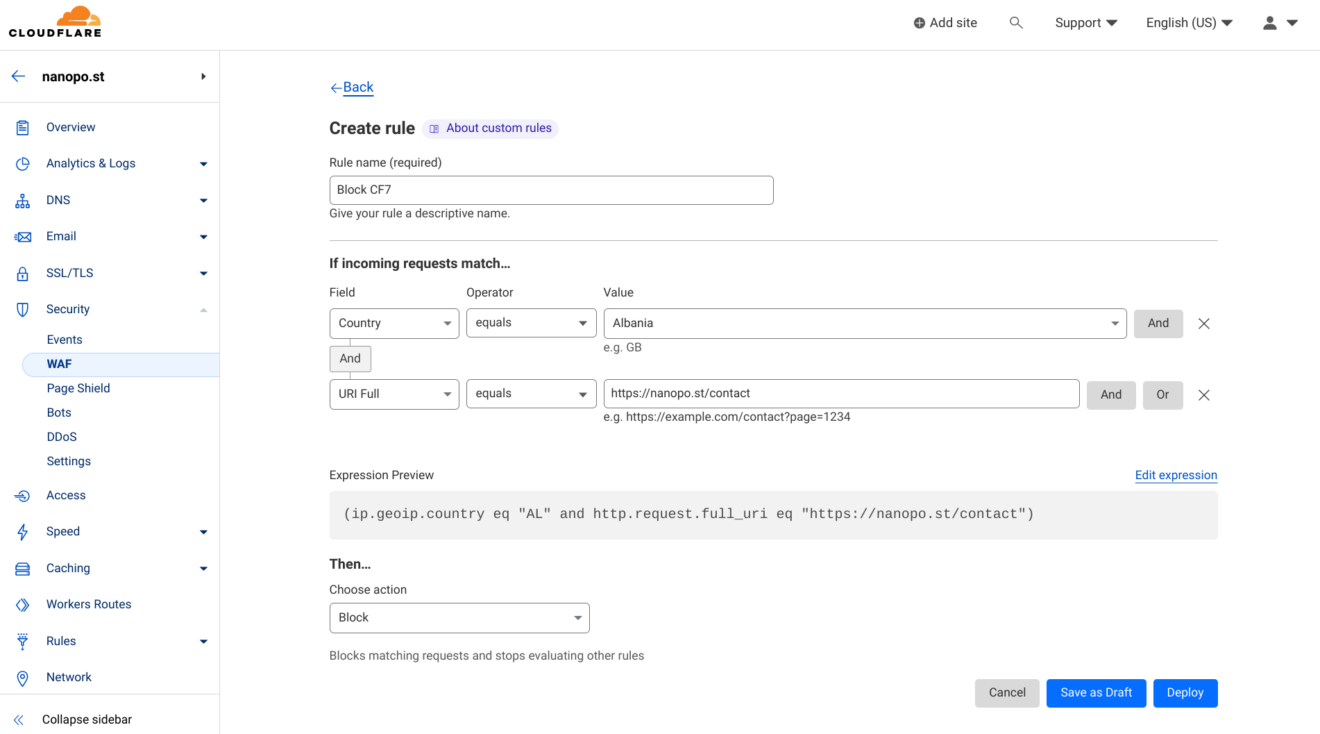
For sites on Cloudflare, a WAF custom rule blocks access by country at the edge, before the request reaches WordPress. No plugin required. Rules can be toggled or deleted from the same WAF screen.
- Log in to the Cloudflare dashboard and select the domain.
- Go to Security > WAF and click Create rule.
- Set the first condition: Country equals the country to block.
- Click And and add a second condition targeting the URI. In the expression editor, this is
http.request.full_uri eq "https://example.com/contact/"(replace with your actual contact page URL). In the visual builder, look for a URI or full URI field option. - Set the action to Block.
- Click Deploy.
This rule applies only to the contact form page, not the whole site. It fires before Cloudflare’s page cache, so no cache exclusion is needed.
2. Wordfence Security Premium country blocking
Country blocking is a Wordfence Premium feature. The free version of Wordfence does not include it. Premium also supports bypass URLs: if a team member travels to a blocked country and needs access, they visit a pre-set URL that sets a cookie allowing them to bypass the block.
Wordfence country blocking is coarser than a Cloudflare WAF page rule: it applies to the whole site, rather than targeting a single URL. For page-specific blocking, Cloudflare WAF or a GeoIP plugin with page-level rules is more precise.
To set it up:
- Install and activate Wordfence Security Premium.
- Go to Wordfence > Firewall > Blocking and select Country Blocking.
- Choose which parts of the site to restrict, and select the countries to block.
- Deploy.
3. GeoIP blocking plugin
For sites not on Cloudflare and not using Wordfence, a dedicated GeoIP plugin applies country-based rules at the page level. Options:
 IP2Location Country Blocker (IP2Location database)
- iQ Block Country (MaxMind GeoLite2; more granular page-level rules than the IP2Location-specific plugins)
- IP2Location Redirection (IP2Location database; redirect-focused)
Configure a rule that redirects visitors from blocked countries away from the contact form page to the home page, or to a dedicated page explaining the service area.
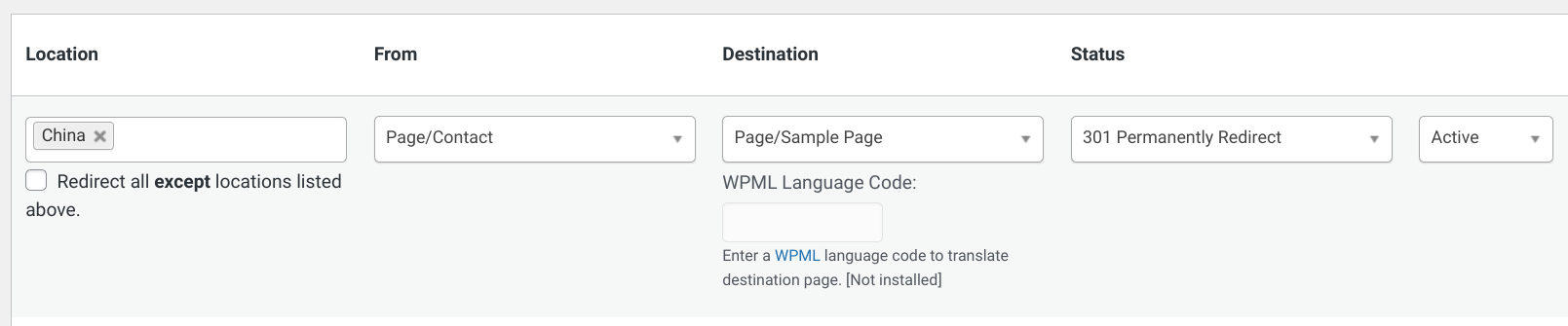
These plugins run in PHP. Add the contact form page to the cache exclusion list if using a page cache (see caveats below).
4. Custom code with caching
For sites with specific requirements not met by any plugin, a template_redirect hook can perform the block in PHP. The hook checks whether the current page contains a CF7 shortcode, determines the visitor’s country via geolocation, and terminates the request if the country is blocked.
The IP detection step differs by server environment:
- Behind Cloudflare: use
HTTP_CF_CONNECTING_IP(the visitor’s real IP forwarded by Cloudflare) or read the country directly fromHTTP_CF_IPCOUNTRY(requires IP Geolocation to be enabled in Cloudflare’s Network settings).REMOTE_ADDRreturns a Cloudflare data-centre IP on Cloudflare-proxied sites, not the visitor’s IP. - Direct connection: use
REMOTE_ADDR.
define( 'GEOLOCATION_METHOD', 'cloudflare' ); // 'cloudflare', 'maxmind', or 'ip2location'
define( 'MAXMIND_ACCOUNT_ID', 'your_account_id' );
define( 'MAXMIND_API_KEY', 'your_maxmind_api_key' );
define( 'IP2LOCATION_API_KEY', 'your_ip2location_api_key' );

function block_users_by_country() {
    global $post;

if ( ! is_object( $post ) || ! has_shortcode( $post->post_content, 'contact-form-7' ) ) {
        return;
    }

// Real visitor IP: use HTTP_CF_CONNECTING_IP behind Cloudflare, REMOTE_ADDR otherwise.
    $visitor_ip  = ! empty( $_SERVER['HTTP_CF_CONNECTING_IP'] )
        ? $_SERVER['HTTP_CF_CONNECTING_IP']
        : $_SERVER['REMOTE_ADDR'];

$country_code = get_transient( 'country_code_' . md5( $visitor_ip ) );

if ( ! $country_code ) {
        switch ( GEOLOCATION_METHOD ) {
            case 'cloudflare':
                // Requires IP Geolocation enabled in Cloudflare Network settings.
                $country_code = $_SERVER['HTTP_CF_IPCOUNTRY'] ?? '';
                break;

case 'maxmind':
                // MaxMind uses HTTP Basic Auth: Account ID as username, API key as password.
                $response = wp_remote_get(
                    "https://geoip.maxmind.com/geoip/v2.1/country/{$visitor_ip}",
                    [
                        'headers' => [
                            'Authorization' => 'Basic ' . base64_encode( MAXMIND_ACCOUNT_ID . ':' . MAXMIND_API_KEY ),
                        ],
                    ]
                );
                $country_code = ! is_wp_error( $response )
                    ? ( json_decode( wp_remote_retrieve_body( $response ), true )['country']['iso_code'] ?? '' )
                    : '';
                break;

case 'ip2location':
                $response     = wp_remote_get( "https://api.ip2location.com/v2/{$visitor_ip}?key=" . IP2LOCATION_API_KEY . "&package=WS1" );
                $country_code = ! is_wp_error( $response )
                    ? ( json_decode( wp_remote_retrieve_body( $response ), true )['country_code'] ?? '' )
                    : '';
                break;
        }

if ( $country_code ) {
            // Cache per-IP for 24 hours; md5 hashes the IP to avoid problematic transient key characters.
            set_transient( 'country_code_' . md5( $visitor_ip ), $country_code, 24 * HOUR_IN_SECONDS );
        }
    }

$blocked_countries = [ 'CN', 'JP' ]; // replace with actual ISO 3166-1 alpha-2 codes

if ( in_array( $country_code, $blocked_countries, true ) ) {
        wp_die( 'Sorry, this form is not available in your region.' );
    }
}

add_action( 'template_redirect', 'block_users_by_country' );
The transient caches the country lookup per IP for 24 hours. Without it, every page load triggers an API call. On high-traffic pages, uncached lookups are slow and expensive on paid API tiers.
Three caveats that determine whether any of this works
PHP-based blocks are invisible to page caches. WP Rocket, WP Super Cache, Bunny.net CDN, and Cloudflare’s page cache all serve cached HTML before PHP runs. Options 2, 3, and 4 above will not fire for cached requests. Exclude the contact form page from the cache, or use the Cloudflare WAF option (option 1), which fires before caching.
Full-site blocking affects crawlability and Ads policy. The instructions above scope blocks to the contact form page only. Blocking an entire country from the site can prevent Googlebot from indexing from those regions, and Google Ads policy may flag geographic restrictions on destination pages.
GeoIP data goes stale. IP-to-country mappings change as IP ranges are reallocated. MaxMind and IP2Location publish update schedules; free-tier databases update less frequently than paid tiers. Stale data produces occasional misclassifications.
Non-blocking alternatives for brand confusion
Country-select field with conditional logic. Add a country dropdown to the form. Using Conditional Fields for Contact Form 7, hide the submit button for any country outside the service area. Visitors from non-UK countries see an explanation rather than a blocked page, which reduces wrong-form volume without a GeoIP lookup.
Top-of-form disclaimer. A single line before the form fields handles the majority of misdirected contacts without any technical setup: “This form is for UK enquiries only. Submissions from outside the UK are not processed.” Brand-confused users are following a search result, not circumventing a block; a direct statement of scope is often enough.
Separate landing page for the confused audience. If the brand confusion is significant enough, a dedicated page titled “Looking for [Other Company]?” with links to the correct company resolves the confusion at source. This takes more content work but cuts the problem off at source instead of filtering it downstream.
The guide on sending Contact Form 7 submissions to multiple addresses covers routing submitted data to different recipients based on form inputs, useful if the goal is separating UK enquiries from others rather than blocking them entirely.