
Most “WordPress is not sending email” reports collapse to one of three diagnostic states: wp_mail() fails outright, the call succeeds but the message never leaves the server, or it leaves the server and lands in spam. Each state has a different cause and a different fix, and the only way to identify which one is in play is to test each layer of the send pipeline in order. Knowing what every test rules out matters more than running any single test.
This guide is the diagnostic side of the WordPress email problem. If the site has not been configured to send mail through an external service yet, the prior step is How to set up email on WordPress.
What “sending” actually means
A WordPress site sends mail through four distinct layers, each of which can succeed independently of the next:
wp_mail(), the pluggable function in WordPress core (wp-includes/pluggable.php). Most plugins call this. A handful call PHP’smail()directly and bypass it.- PHPMailer, the library WordPress core bundles and instantiates inside
wp_mail. By defaultwp_mailconfigures PHPMailer to use PHP’smail()function, which hands the message to a local MTA (sendmail, Postfix, Exim). A mailer plugin replaces this default by hooking the pluggablewp_mailor reconfiguring PHPMailer to speak SMTP or an HTTPS API directly. - The MTA or relay, which queues the message and tries to deliver it to the recipient’s mail server.
- The receiving server, which decides whether to accept, reject, or quarantine the message based on authentication (SPF, DKIM, DMARC) and reputation.
A send can succeed at layer 1 and fail at layer 2. It can succeed all the way through layer 3 and still land in spam at layer 4 because of a missing DKIM signature on a strict-DMARC domain. “The test email arrived” is not the same as “the site can send email,” and “the test email did not arrive” is not the same as “WordPress is broken.”
The diagnostic procedure is to test each layer in turn and read the result correctly.
Versions tested
The procedures below were verified against WordPress 7.1 with PHP 8.3, the Check & Log Email plugin at version 2.0.16, and WP-CLI 2.12 on a Debian-family host running Postfix. wp_mail has been in core since WordPress 1.2.1 and wp_mail_failed since 4.4; the complementary wp_mail_succeeded hook was added in 5.9 and is referenced below.
Test 1: Confirm the WordPress mail function works
The first test is whether wp_mail() returns successfully. The cleanest free tool for this is the Check & Log Email plugin, which installs an admin screen with a send-test form and a log of every message wp_mail has processed since activation.
Install and activate. The plugin adds a “Check & Log Email” item to the admin menu. Enter a recipient address you can read, set a subject, and click “Send Test Mail”. The plugin reports either a success notification (the message was handed off without raising an error) or a failure with the error message.
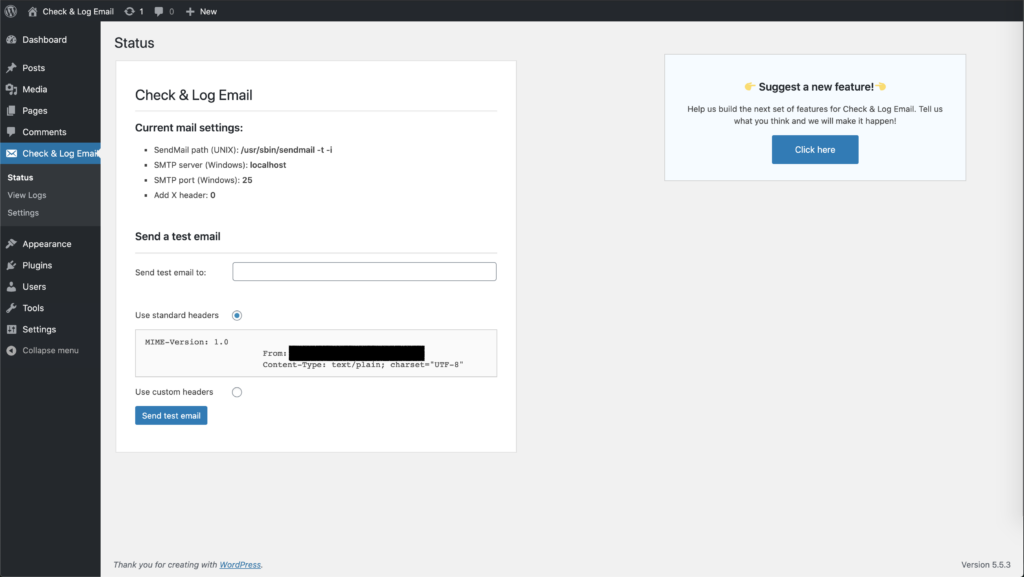
A green tick proves one thing only: wp_mail() returned true. That means PHPMailer accepted the message and the underlying transport (PHP mail() or SMTP) did not raise an immediate error. It does not prove the message will reach the inbox, will not be filtered, or will pass authentication at the recipient end.
A red error proves the opposite end of the same point: wp_mail could not hand the message off at all. The wp_mail_failed action hook fires alongside, with an WP_Error carrying the underlying message; mailer plugins typically surface this in their logs. The complementary hook is wp_mail_succeeded, added in WordPress 5.9, which fires when wp_mail returns true and is the canonical place to observe successful handoff from outside the calling plugin.
The Check & Log Email plugin is the test tool of choice because the log view doubles as a record of every other wp_mail call on the site (form submissions, password resets, WooCommerce notifications), which is useful when the problem turns out to be a single plugin and not the install. The same role is played by  WP Mail Logging and Email Log, and most SMTP mailer plugins (WP Mail SMTP, FluentSMTP, Post SMTP) include their own test-send and log features.
Test 2: Confirm without a plugin, via WP-CLI
When the admin UI is unreachable, when no plugin is installed, or when the test needs to run across many sites,  WP-CLI is the cleaner option. From a shell on the server:
wp eval 'echo wp_mail("[email protected]","wp-cli test","body") ? "sent\n" : "FAILED\n";'wp_mail returns a boolean. A sent result means what the plugin’s green tick means: wp_mail() returned true and the transport raised no immediate error. FAILED means wp_mail returned false, and again wp_mail_failed will have fired with details a logging plugin or a custom debug snippet can capture.
This is the test to use when the question is “does this install send email at all,” with no assumptions about which plugins are present. It is also the test to script when checking a fleet.
Test 3: Read the server log
A passing test at layers 1 and 2 says the message left WordPress. The next question is whether it left the server.
On a host with PHP’s mail logging enabled, php.ini carries a mail.log directive (the  PHP manual covers the setting) and every call to
 mail() writes a line recording the script that issued it and the recipient. The MTA log lives in different places depending on the distribution: on Debian and Ubuntu, Postfix writes to /var/log/mail.log; on RHEL-family systems with systemd, the same content is reachable via journalctl -u postfix. Exim writes to /var/log/exim4/mainlog; sendmail to /var/log/maillog. The log line records whether the message was queued, what relay it was handed to, and whether the relay accepted it.
When wp_mail succeeds but the MTA log shows no corresponding outbound message, the host is dropping the call silently. This is the signature of a sandboxed mail() function on shared hosting, or a mail() override that returns true without doing anything.
When the MTA accepts the message but the next hop refuses it, the log will say so. Common refusals: blocked source IP, missing SPF record, missing DKIM signature on a domain with a strict DMARC policy.
When a mailer plugin is in use, its own send log is the equivalent record and is usually easier to read than the system log. FluentSMTP, WP Mail SMTP, and Post SMTP all keep one.
Reading the three outcomes
The three results worth distinguishing:
Failure at the WordPress layer. wp_mail() returns false. The error is captured by wp_mail_failed and surfaced in a logging plugin. The cause is almost always a missing or broken transport: no MTA on the host, blocked outbound port 25, or an SMTP plugin configured with bad credentials. The fix is to install a mailer plugin (FluentSMTP and WP Mail SMTP are the two safe defaults) and route mail through a transactional sending service. Many shared hosts disable mail() entirely and expect every site to do this.
Success at the WordPress layer, no inbox arrival. Tests pass; the recipient inbox stays empty, including the spam folder. The message was handed to the local transport and lost between there and the receiving server. Either the local transport dropped it (test 3 confirms this), the receiving server rejected it (the bounce, if there is one, appears in the MTA log), or it was accepted and silently filtered. The next step is a deliverability test from outside WordPress: send to a service like  mail-tester.com and inspect the SPF, DKIM, and DMARC results, then check the sending IP against the major blocklists.
Success and inbox arrival, but in spam. A separate problem, and the most common one once the basic plumbing works. The mail is being sent, accepted, and routed to junk because of authentication failure or sender-reputation issues. The fix lives in DNS, not in WordPress: SPF, DKIM, and DMARC records configured correctly for the sending domain, plus alignment between the address WordPress uses in the From: header and the domain those records cover.
Things that look like a send problem but are not
A few cases that produce reports of “WordPress is not sending email” while actually testing fine:
- Plugins that bypass
wp_mail. A handful of older contact-form and WooCommerce plugins call PHP’smail()directly. Their notifications fail even when every WordPress-level test passes, because the test never touches their code path. The fix is to use a plugin that respectswp_mail, or to file a bug with the vendor. - From-address misalignment. A site sending as
[email protected]from a host whose SPF record does not authorise the host’s IP foryourdomain.comwill see test mail accepted by some receivers and silently dropped by others. The send succeeds; the delivery is selective. A mail-tester run will show the SPF failure. - Queueing layers. WooCommerce dispatches transactional mail through Action Scheduler, and some marketing and CRM plugins use Action Scheduler or their own cron-driven queues to defer sends. A “missing” test email is sometimes a queued one: the
wp_mailcall has not happened yet because the scheduled task has not run. Check Tools -> Scheduled Actions (WooCommerce) or the plugin’s queue view before assuming a failure.
What to install
For a UI-driven test of wp_mail: Check & Log Email. It is free, supported, and the log doubles as an audit trail for every other email the site sends.
For routing mail through a relay when the host cannot send directly: a mailer plugin (FluentSMTP, WP Mail SMTP, Post SMTP, SMTP Mailer) connected to a transactional sending service. The mailer plugin replaces wp_mail with one that goes through an SMTP server or an HTTPS API, side-stepping the local MTA entirely.
For deliverability problems that survive a successful send: SPF, DKIM, and DMARC, configured at the DNS layer for the sending domain.
The Check & Log Email plugin is not a mailer plugin. It will not fix a server that cannot send. It will tell you the server cannot send. That is half the diagnosis.
Tests in order, layer by layer. The answer falls out.